Assigning salaries
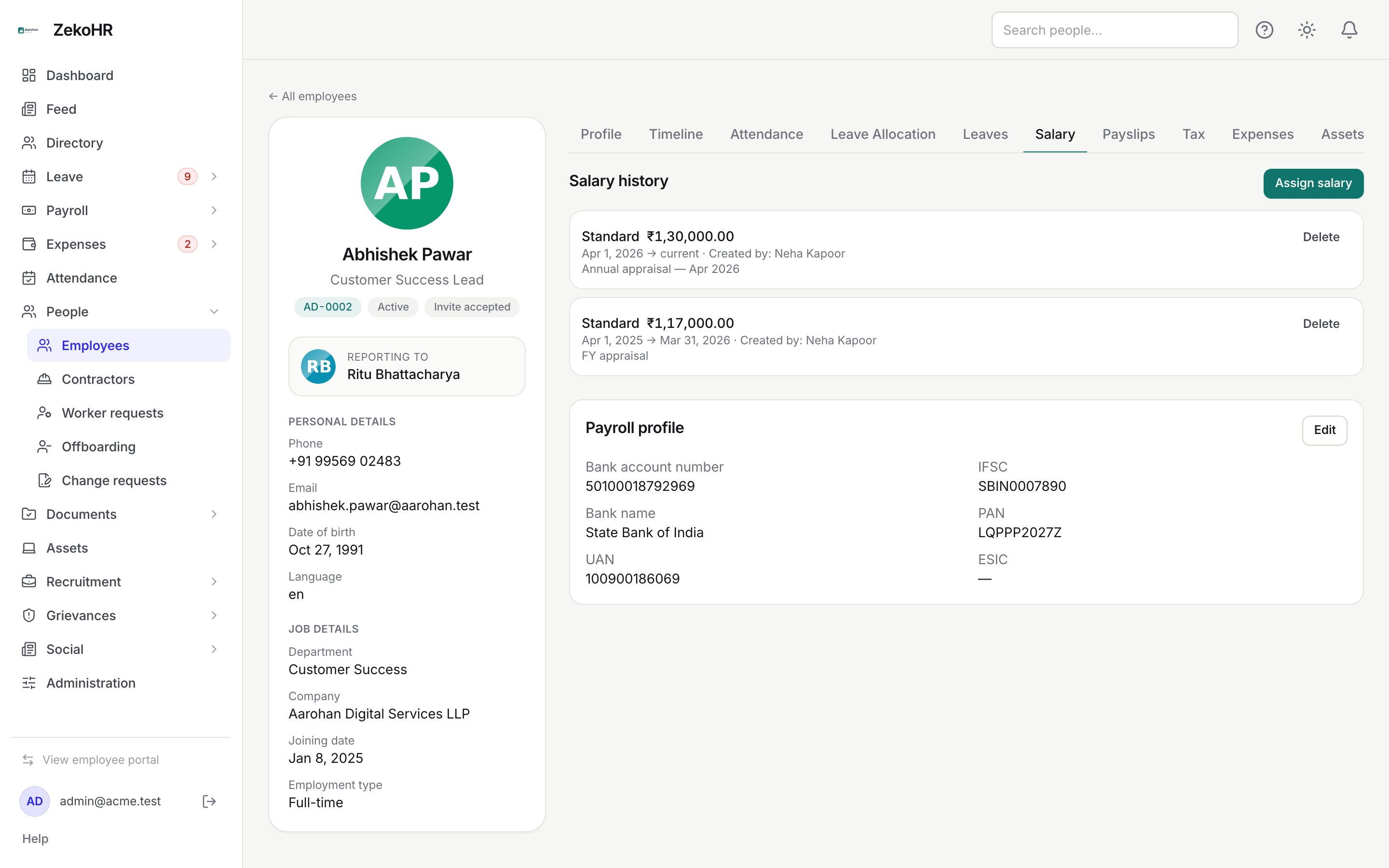
An employee is included in a payroll run only if they have a salary assignment that is effective in that month. An assignment pairs a salary structure with the person's monthly gross from a given date. Assignments are never edited in place: increments and corrections are new rows with later dates, so every month uses the row that governed it. The same tab holds the Payroll profile card with bank and statutory identifiers.
Who can do this: Admins with `payroll.manage.any`, HR Managers with `payroll.manage.assigned_companies`. `payroll.view.*` shows the tab read-only.
Where to find it
Sidebar People → Employees, open the employee, then the Salary tab (URL path `/employees/<id>?tab=salary`). The tab is hidden for users without payroll view rights. This module must be enabled on your plan; Admins can check Settings → Billing.
Assigning a salary
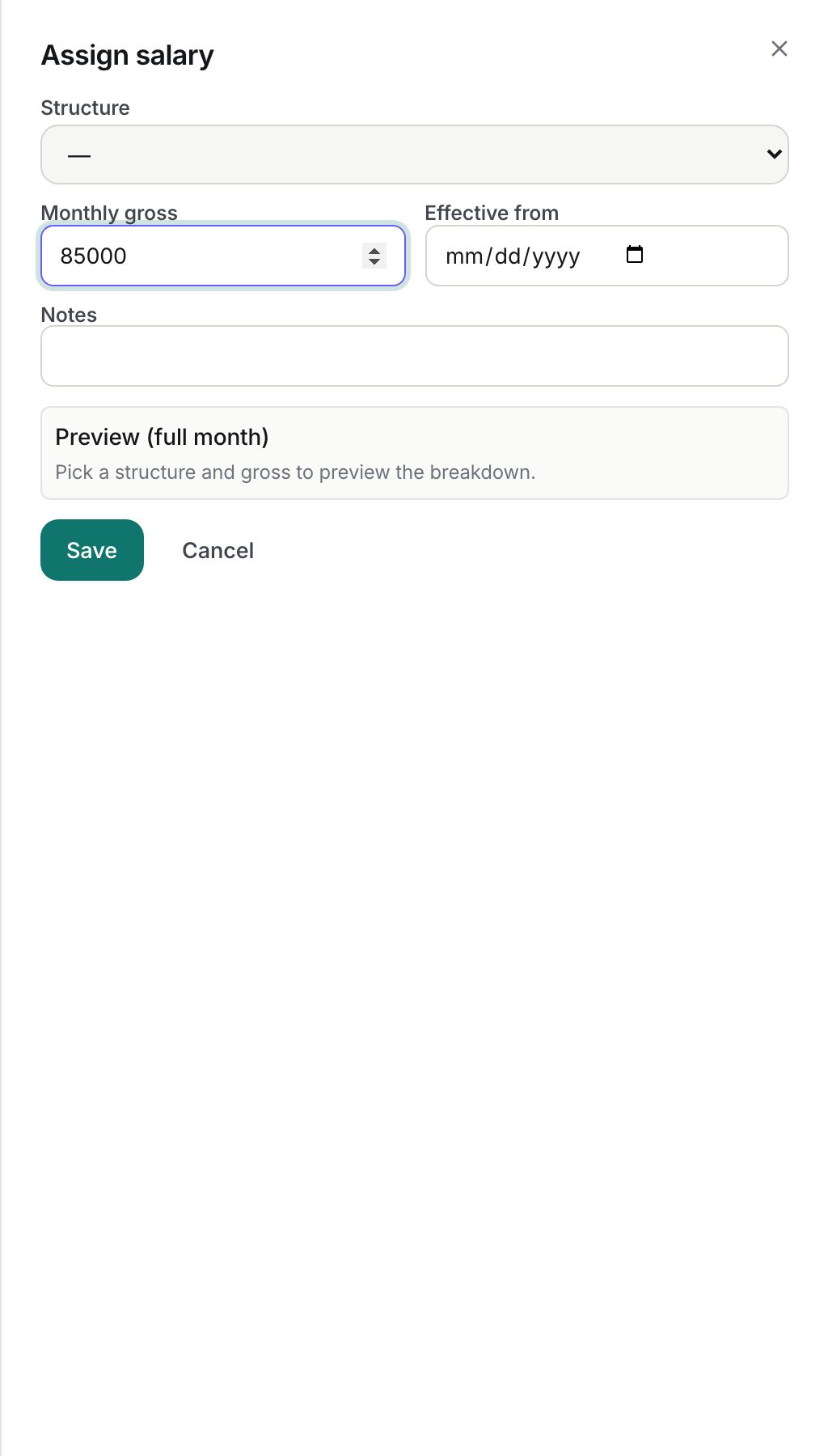
- Click Assign salary. If the employee has no company, the tab asks you to set one on the Profile tab first.
- Structure: choose an active salary structure of the employee's company. If none exists the dialog says so.
- Monthly gross: required, greater than 0, in the company currency.
- Effective from: required date. Only one row per employee may start on a given date.
- Notes: optional, up to 500 characters (for example "Annual increment 2026").
- Watch Preview (full month): as soon as a structure and gross are entered, the dialog lists every line with its computed full-month amount (deductions with a minus sign). Nothing is saved by the preview.
- Click Save. The row appears in Salary history with its structure, gross, effective from date, current or the derived effective-to date, who created it and the notes.
Which row a payroll month uses
Each run picks the row with the greatest Effective from on or before the last day of the month. There is no mid-month blending: an increment dated the 15th applies to the whole month. The derived Effective to on an older row is simply the day before the next row starts.
Removing a row
Delete on a row asks for confirmation, then removes it. It is refused if any finalized or published payslip was computed from it ("Roll the payroll run back before removing it"). There is no override; roll the run back first if the row is genuinely wrong.
Payroll profile card
Click Edit on the Payroll profile card to set Bank account number (up to 34 characters), IFSC (11), Bank name (120), PAN (10), UAN (12) and ESIC (17). Click Save. HR sees the full account number; the employee sees it masked to the last four characters, and the payslip PDF prints it masked. The audit log stores only the last four characters. PF opted in and ESI applicable flags are shown on the Profile tab.
Employees cannot edit these values themselves. They request changes through My record → My change requests, which you review under Change requests.
What happens next
- Saving or deleting an assignment writes an audit log entry with structure, gross and effective date. Profile edits are logged with masked values.
- A draft run that already exists for the month picks up a new or changed assignment when you click Recalculate; new eligible employees get a payslip and anyone who lost their assignment loses their draft payslip unless it had manual edits.
- The payroll pre-flight flags employees with no effective assignment (error), a structure that is empty or missing (error), a deactivated structure (warning), missing bank account or IFSC (error) and missing PAN or UAN (warning), each with a Fix link to this tab.
Rules and limits
- The structure must belong to the employee's company; cross-company assignment is refused.
- Invoice-track contractors are never on payroll; the tab is still visible but a run will not pick them up.
- Future-dated rows are allowed, so you can record an increment before it takes effect.
- Gross is stored on the row; a change to the structure's lines changes future computations but not the gross.
- Currency is read from the company at display time.
Troubleshooting
The structure list is empty. No active structure exists for this company. Create one under Settings → Payroll → Salary structures.
Save is refused for Effective from. A row already starts on that date. Delete it or choose another date.
The preview shows a line at zero. A balance line is floored at zero when other earnings already consume the gross, or a % of basic line has no Basic to resolve against.
I cannot delete an old row. A finalized or published payslip used it. Roll that run back, delete the row, then recalculate and republish.