Email log
The Email log is a permanent, organisation-scoped record of every email the system has tried to send: authentication messages, notifications, digests and test sends. Each entry stores the recipient, subject, template, mailer and the exact rendered body, so "did the invitation go out, and what did it say" is answerable without asking the recipient.
Who can do this: `email_logs.view`, which only the Admin bundle holds by default. Bodies can contain password-reset and sign-in links, so this permission is deliberately not given to HR Managers.
Where to find it
Administration → Settings → Other → Email log, URL `/settings/email-log`.
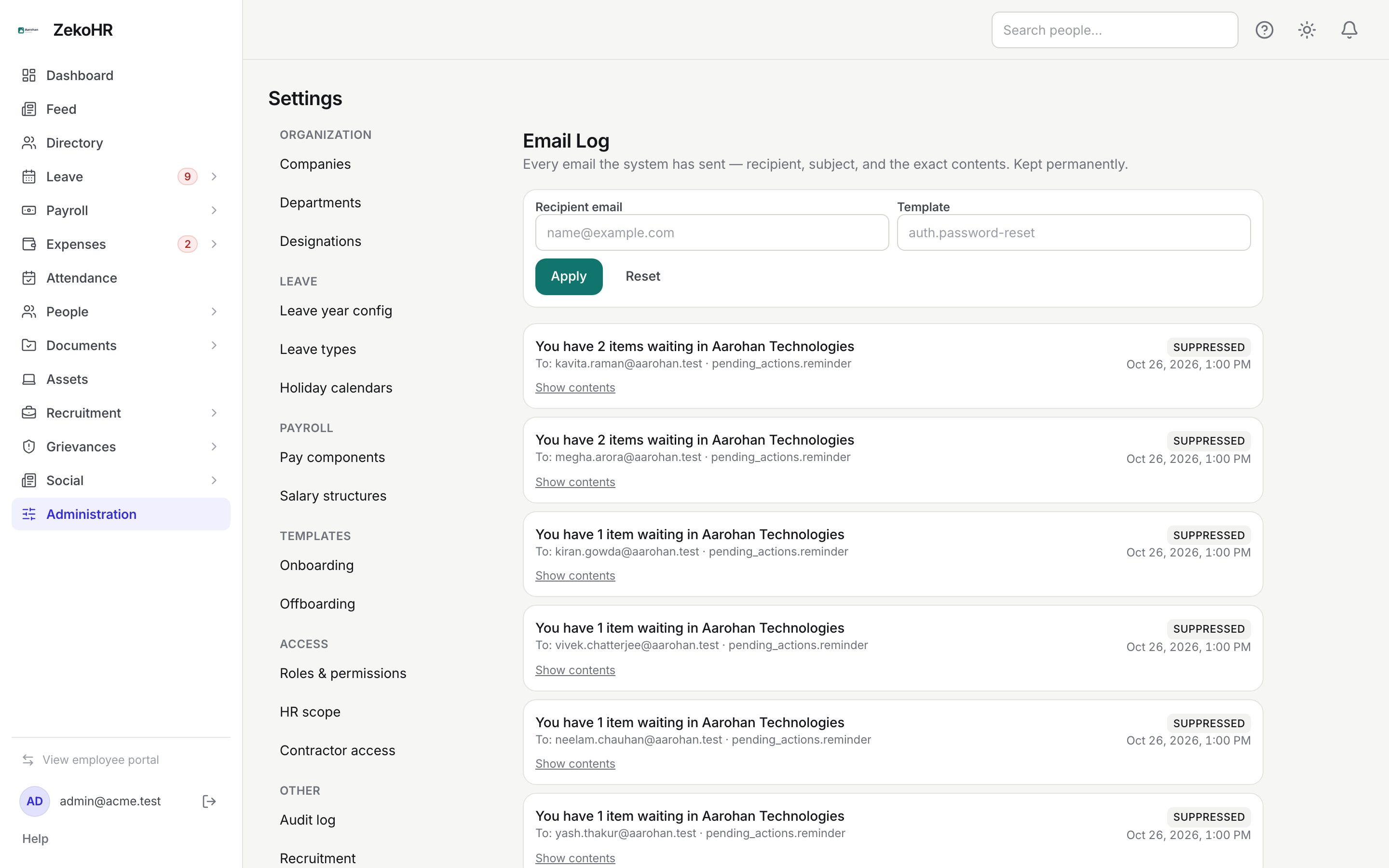
Finding a message
- Enter part of an address in Recipient email (it matches anywhere in the address, so a domain works) and, or instead, a slug in Template such as `auth.password-reset`. The template filter is an exact match.
- Click Apply. Reset clears both filters.
- The list shows the newest 50 entries; click Load more at the bottom for the next page. Each card shows the subject, To: address, template slug, a status badge and the sent time.
Opening a message
Click Show contents on a card. The entry expands with From, To, Template and Mailer, an error line if the mailer reported one, and the rendered HTML in a sandboxed frame (or the plain-text body if there was no HTML). "This email had no body." appears for messages logged without content. Hide contents collapses it again.
Statuses
| Status | Meaning | What happens next |
|---|---|---|
| sent | The mailer accepted the message | Delivery is now in the hands of the recipient's provider; nothing further is recorded |
| failed | The mailer rejected it | The error text is shown in the expanded view; fix the cause (bad address, mailer outage) and trigger the action again |
| suppressed | ZekoHR chose not to send | Typical for digests to people who turned the email channel off, or addresses on a suppression list; nothing to do unless the person wants it |
Statuses are recorded by the mail pipeline, so you may also see mailer-specific values; the expanded view's Mailer line tells you which transport handled it.
Template slugs you will see most
| Slug | When |
|---|---|
| `auth.invitation` | An employee or contractor is invited |
| `auth.password-reset`, `auth.magic-link` | Sign-in help |
| `auth.two-factor-code` | Email 2FA code at sign-in |
| `security.two-factor-enabled`, `-disabled`, `-reset` | 2FA changes on an account |
| `leave.applied`, `leave.approved`, `leave.rejected` | Leave workflow |
| `payroll.payslip_published` | Payslips released |
| `pending_actions.reminder` | The daily "items waiting" digest |
| `trial.lifecycle.*` | Trial and billing emails from the platform |
Filter by any of these to audit one flow end to end.
What happens next
Nothing on this page sends, resends or deletes. To resend an invitation use the employee's profile; to resend a password reset the person uses Forgot password on the sign-in page. To change wording, edit the template under Settings → Email templates; the log keeps the version that was actually sent, so before-and-after comparisons are possible.
Rules and limits
- Entries are kept permanently and cannot be deleted from the portal; they survive the person leaving.
- The log is scoped to your organisation; you never see another organisation's mail even on a shared address.
- The list omits bodies for speed; they are fetched when you expand a card.
- The frame that shows the body runs no scripts and has no access to the app, so a stored email cannot act on your session.
- Pages are 50 entries.
- There is no export button for the email log; the audit log has one, the email log does not.
Troubleshooting
A person says they never received an email that shows as sent. Ask them to check spam, then confirm the To address in the expanded view is correct on their profile.
The invitation shows as suppressed. The address is on the suppression list or the channel was disabled; invitations are normally always-on, so ask the ZekoHR team at [email protected], quoting the subject and time of the entry.
I cannot see this page. By default only Admins can open it, and it is not plan-gated.
I need the body as a file. Expand the entry, select the frame contents and copy; there is no download.