Your dashboard
The dashboard is the page you land on after signing in. It gathers what changes daily: items waiting for you, your leave balances, who is away, this week's celebrations and the next holiday. Each card links to its full page.
Who can do this: Every signed-in employee. Cards appear only with the matching permission, for example `directory.view` for People, `leave_requests.approve.direct_reports` for approvals, `celebrations.greet` for the greeting button.
Where to find it
Dashboard in the sidebar, at `/`.
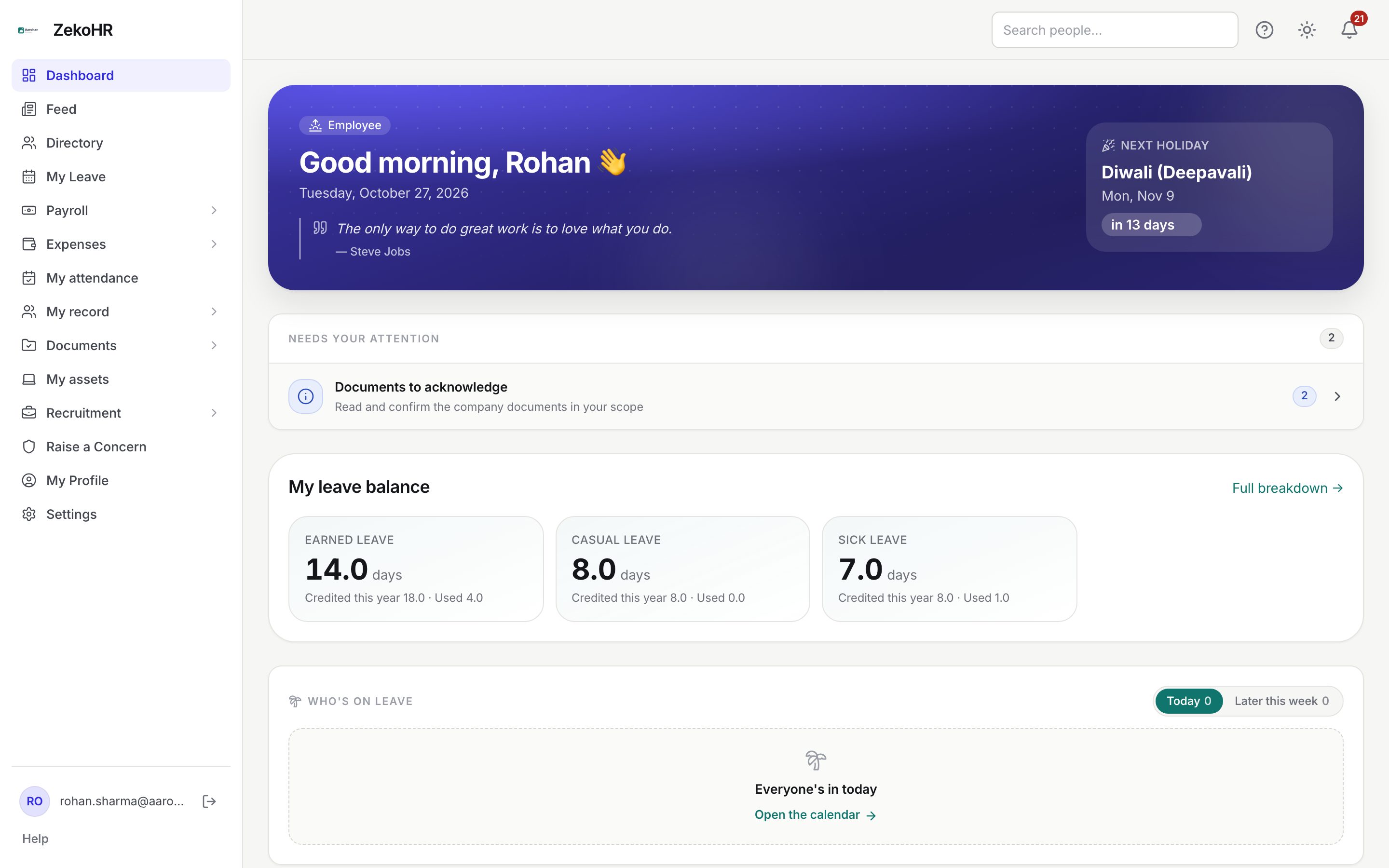
The banner
The banner greets you by first name with Good morning, Good afternoon or Good evening, shows your role chip and today's date, and rotates a quote daily. On the right, Next holiday names the next date on your holiday calendar with a countdown (Today, Tomorrow or in N days) and opens Holiday Calendar. It is hidden when no future holiday exists.
Admins who have not finished the setup checklist also see a setup card here until they dismiss or complete it.
Needs your attention
Everything waiting on you, most urgent first, with a count per row. The card disappears when nothing is pending, and each row is shown only to people with the relevant permission.
| Row | Who sees it | Opens |
|---|---|---|
| Documents were rejected | Anyone with a rejected upload | Documents |
| Grievances awaiting review | HR with grievance access | Grievances |
| Leave requests to approve | Managers, HR, Admins who approve leave | Approvals |
| Expense claims to approve | Expense approvers | Expense Approvals |
| Cash advances to approve | Advance approvers | Advances |
| Documents to verify | Documents Center managers | Documents |
| Documents requested by HR | Anyone with an open request | Documents |
| Onboarding steps to complete | New joiners with a checklist | My onboarding |
| Exit checklist steps to complete | People being offboarded | My offboarding |
| Documents to acknowledge | Anyone with unread company documents | Documents |
| Complete your profile | Anyone below 100% | My Profile |
My leave balance
One tile per allocated leave type: the name, the current balance in days or hours, and a Credited this year and Used line. Comp-off tiles show the comp-off available. Full breakdown → opens My Leave on the balance tab. With no allocation the card offers Request leave allocation →. Employee portal only, and only when leave is enabled for you.
Who's on leave
Two tabs, Today and Later this week, covering today plus six days. Each row shows the person, their leave type or just On leave when your organisation hides types from colleagues, the date range and a Half day (AM), Half day (PM) or Few hours badge. The server applies each person's leave visibility setting (everyone, team or restricted). The empty state reads Everyone's in today with Open the calendar.
Celebrations this week
Sections appear only when they have entries: Today's birthdays, This week's birthdays (next 7 days), Upcoming work anniversaries (next 30 days, with years) and New joiners (joining this week). Entries come from your own company. People with `celebrations.greet` (HR by default) see a Send a greeting button that emails and notifies the person; one greeting per person per day, each audited.
People
A search box over the company directory by name, designation or department, showing the first five matches. View full directory opens Directory. Shown only with `directory.view`.
Profile completeness, Quick actions and Today
These three cards sit in a row in the employee portal.
- Profile completeness shows a percentage and up to three missing items, each linking to the field or document tab that fixes it. What counts is set by your organisation (phone, date of birth, employment type, designation, department, joining date, required document categories).
- Quick actions offers Apply for leave, My leave, Holiday calendar and My payslips. Leave actions hide when leave is disabled for you; payslips when you have no payroll record.
- Today shows the date, Day N of the year with a progress bar, and Show local weather, which asks the browser for location and fetches the current temperature from Open-Meteo. Nothing is stored.
Rules and limits
- Every card is a summary. One that fails to load hides itself rather than breaking the page.
- Counts refresh when you return to the page; the bell badge polls every minute on its own.
- In the admin portal the personal cards are hidden; Needs your attention stays because approvals belong there too.
- Contractors see a different home with their engagements and only the modules they are granted.
Troubleshooting
My leave balance card is empty. No allocation exists for the current leave year. Use Request leave allocation → or ask HR.
Celebrations do not show my birthday. Date of birth is missing on your profile, or you are in a different company from the viewer.
Needs your attention shows an approval I already decided. Reload; the card caches briefly.
Weather says unavailable. The browser denied location access or the forecast service was unreachable. The card works without it.