Recruitment reports
Reports has two tabs. Source effectiveness shows, per candidate source, how many people were added and how far they got. MIS is one row per application with everything from screening score to offer CTC and joining date, filterable and exportable to Excel or PDF.
Who can do this: Source effectiveness needs `recruitment.dashboard.view.any` or `recruitment.dashboard.view.assigned_companies` (Management, HR, Recruiters) or a manage permission. The MIS tab and exports need `recruitment.reports.export`. HR Managers see only companies in their HR scope.
Where to find it
Recruitment → Reports, at `/recruitment/reports`. Dashboard cards can deep-link here with `tab=mis` and a stage preselected.
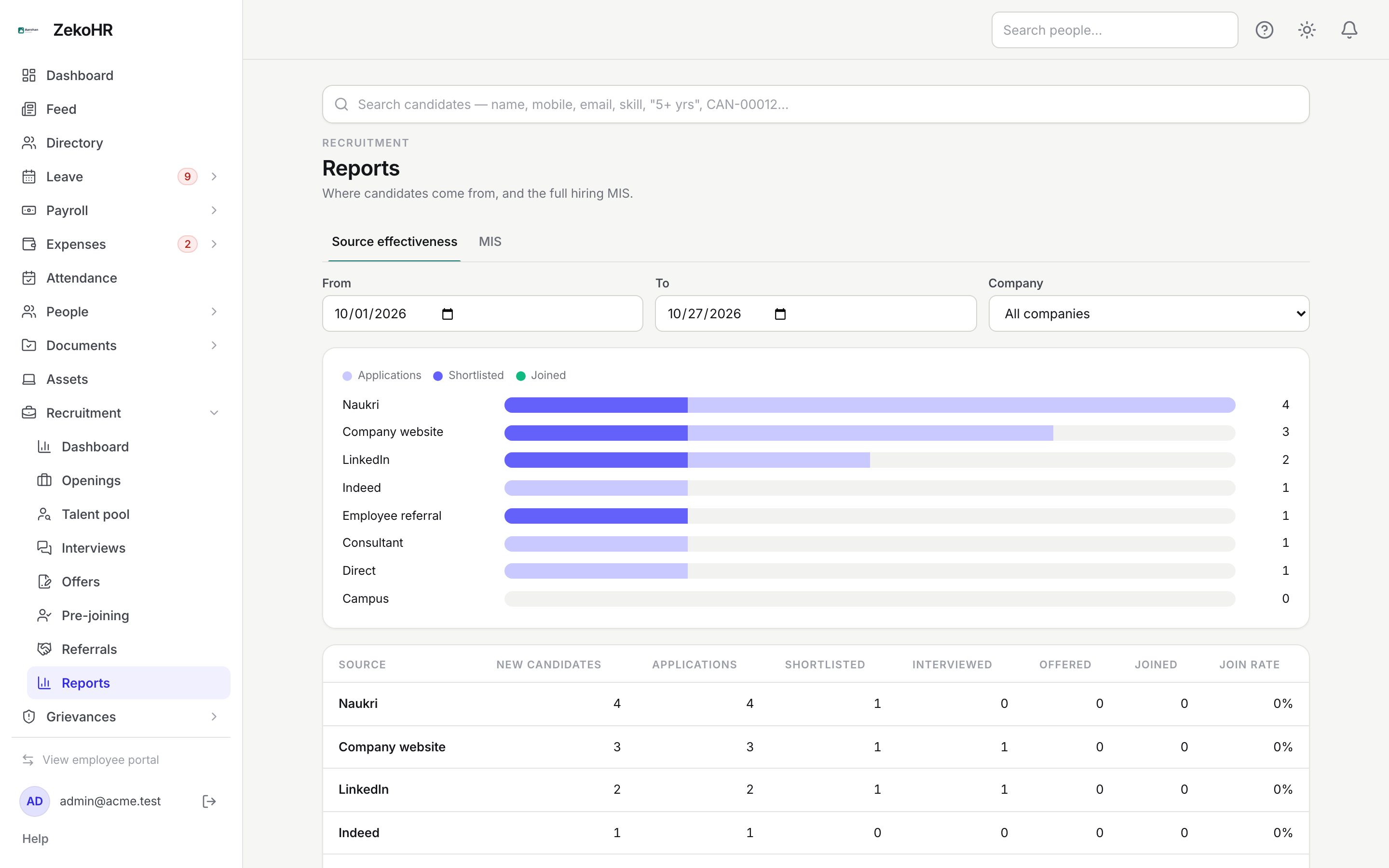
Common filters
From and To default to the first of the month and today. Company appears when you can see more than one. Both tabs use the same range.
Source effectiveness
The bars show, per source, applications (light), shortlisted (brand) and joined (green) on one scale, sorted by applications. The table underneath breaks it down.
| Column | Meaning |
|---|---|
| Source | The source from Settings → Recruitment → Sources. |
| New candidates | Candidates created in the range with this source. |
| Applications | Applications in the range with this source. |
| Shortlisted | Applications that reached Shortlisted or beyond. |
| Interviewed | Applications with at least one interview. |
| Offered | Applications that reached an offer. |
| Joined | Applications that reached Joined. |
| Join rate | Joined divided by applications. |
MIS
- Click Filters to narrow by Department, Position / job, Recruiter, Joining status (Yet to join, Joined, Dropped), Status chips (one per stage category) and Source chips. Clear filters resets them.
- A summary strip shows the total and a count per stage.
- Rows are paginated 25 at a time (Previous / Next).
- Export Excel downloads a real .xlsx; Export PDF a printable PDF. Both apply the current filters and date range.
| Column | Meaning |
|---|---|
| Candidate | Name, code and phone. |
| Job | Title and code. |
| Department, Recruiter, Source | As on the job and candidate. |
| Applied | Application date. |
| Status | The job's stage name (falls back to the category). |
| Score | Screening score out of 10. |
| Last interview | Round name, date and the latest recommendation. |
| Offer CTC | Annual CTC with currency, and the offer status under it. |
| Joining | Actual joining date, or the expected date marked "exp.". |
What happens next
Exports are generated on request and download immediately; nothing is emailed or stored. No notifications are sent.
Rules and limits
- The date range applies to the application date on the MIS and to candidate and application creation on the source report.
- Management users with dashboard-only access see Source effectiveness but not the MIS tab.
- Recruiter filter options come from recruiters named on jobs you can see.
- Compensation columns appear because the MIS is HR-only; hiring managers cannot open this page.
Troubleshooting
The MIS tab is missing. Your role cannot export recruitment reports; HR Managers, Recruiters, Management and Admins can by default.
Source effectiveness is empty. No candidates were added in the range; widen the dates.
Export failed. Large exports can time out; narrow the range or filters and try again.
Join rate shows a dash. The source had no applications in the range.