People directory
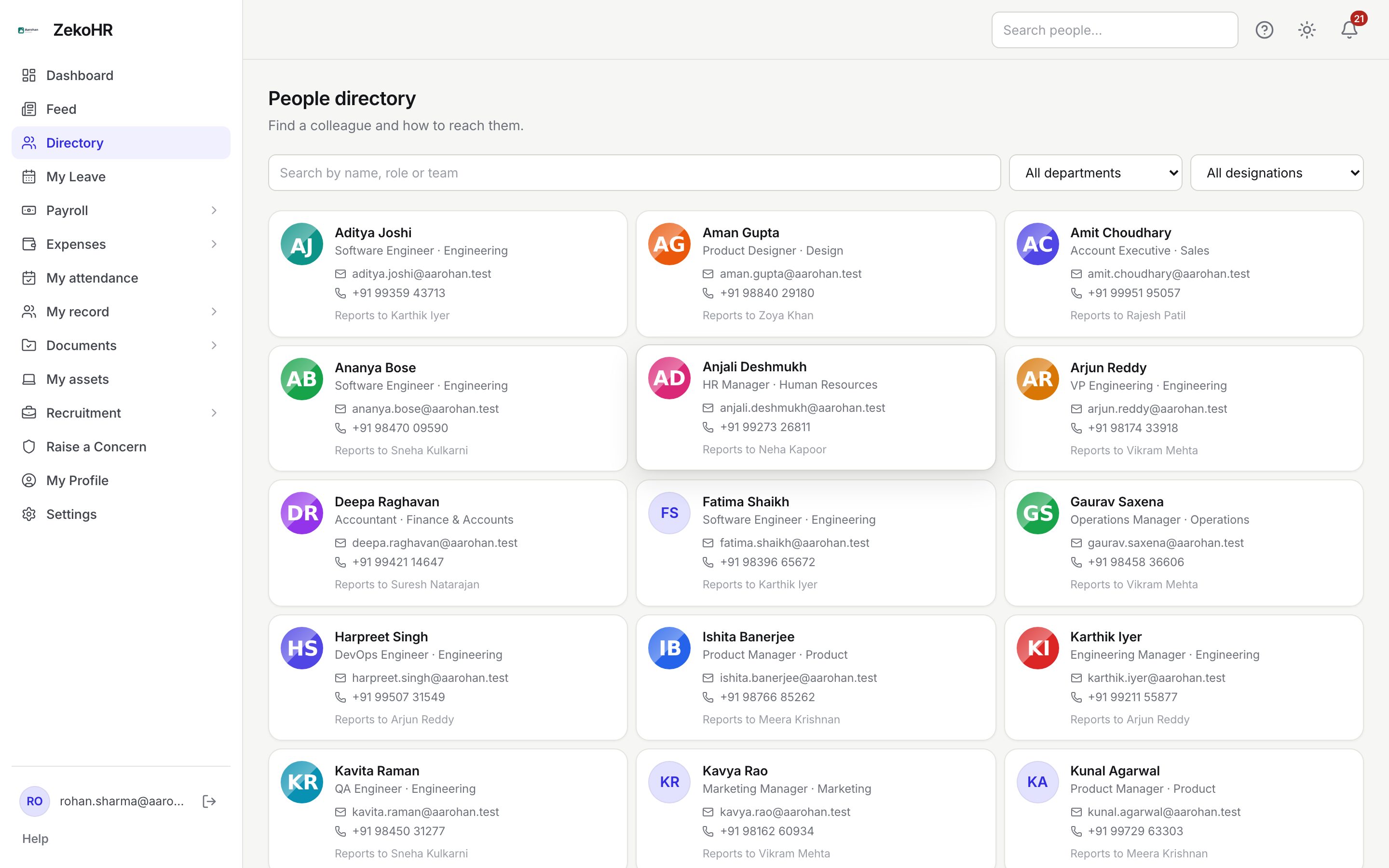
The People directory is the company phone book. It shows every active colleague with their designation, department, work email, phone number and reporting manager, so you can find the right person and contact them without asking around. It never shows pay, bank, statutory or document data.
Who can do this: Everyone with `directory.view`, which every provisioned role (Employee, Manager, HR Manager, Accounts, Recruiter, Management, Admin) has by default.
Where to find it
Directory in the sidebar, in both the employee portal and the admin view. URL path: `/directory`.
Finding someone
- Type in Search by name, role or team. The list narrows as you type. The search matches the person's name, email, designation and department, so "engineer" and "finance" work as well as a surname.
- Narrow by Department with the All departments dropdown. When your organisation has more than one company and you can see all of them, each department is labelled with its company (for example "Engineering · Aarohan Digital Services LLP"), because two companies can both have an Engineering department.
- Narrow by Designation with the All designations dropdown. Designations are shared across companies.
- If you can see more than one company, a Company dropdown (All companies) appears first. Picking a company drops any department filter that belongs to a different company.
The department, designation and company filters are applied by the server; the text search filters the loaded page in your browser, so it responds instantly.
Reading a card
| Element | Meaning |
|---|---|
| Photo or initials | The profile photo the person uploaded on My Profile; initials when there is none |
| Name | Their display name as held on the employee record |
| Contractor badge | Shown for Contractors and agency workers, so you know they are not employees |
| Designation · Department | Their title and the department they sit in; a dash means not set |
| Tap to open a new email in your mail app | |
| Phone | Tap to dial on a phone; this is the single phone number on their profile, there is no separate work and personal number |
| Reports to | Their reporting manager, when one is set |
Cards are read only. There is no detail page behind a card; HR users who need the full record use People → Employees instead.
What happens next
Nothing is written when you browse the directory. Your own card updates when you change your phone, photo or name on My Profile, or when HR approves a change request or edits your record.
Rules and limits
- Only people with status Active are listed. Colleagues on leave still show as active; people who are inactive, terminating or offboarded do not appear.
- Agency back-office admins with no active engagement are hidden.
- You see your own company only, unless you are an Admin, in which case you see every company in the organisation and get the Company filter. The filter options follow the same rule, so you are never offered a department from a company you cannot browse.
- The directory returns at most 200 people per request, sorted by name. Use the filters to narrow a large organisation.
- The field set is fixed: name, email, phone, photo, designation, department, company, reporting manager and contractor badge. Date of birth, address, salary, bank, PAN and documents are never included.
Troubleshooting
I cannot see the Directory item in the sidebar. Your role is missing the directory permission. Every default role has it; if an Admin edited roles under Administration → Settings → Roles & permissions, ask them to restore it.
A colleague is missing. They are either not active (on their way out, or not in the system), in a company you cannot browse, or a contractor agency admin with no engagement. HR can check their status on People → Employees.
The phone number is wrong or blank. The number comes from the profile. The person can edit Phone on My Profile, or HR can edit it on their employee record.
I only see one company. That is by design. Ask an Admin if you genuinely need to browse other companies; only Admins can.
Search finds nothing for a department name. The text box matches the department shown on each card, but filters run first. Clear the dropdowns, then search again.