The feed and posting updates
The feed is ZekoHR's internal social wall. Anyone in the organisation can post an update with photos, documents or a video, tag colleagues and topics, and read what the team is sharing. The same page carries kudos, announcements, polls and celebrations.
Who can do this: Every employee with `social.view` reads the feed and `social.post.self` posts to it. Both are in every default role bundle. Contractors see the feed when it is switched on for them. This module must be enabled on your plan; Admins can check Settings → Billing.
Where to find it
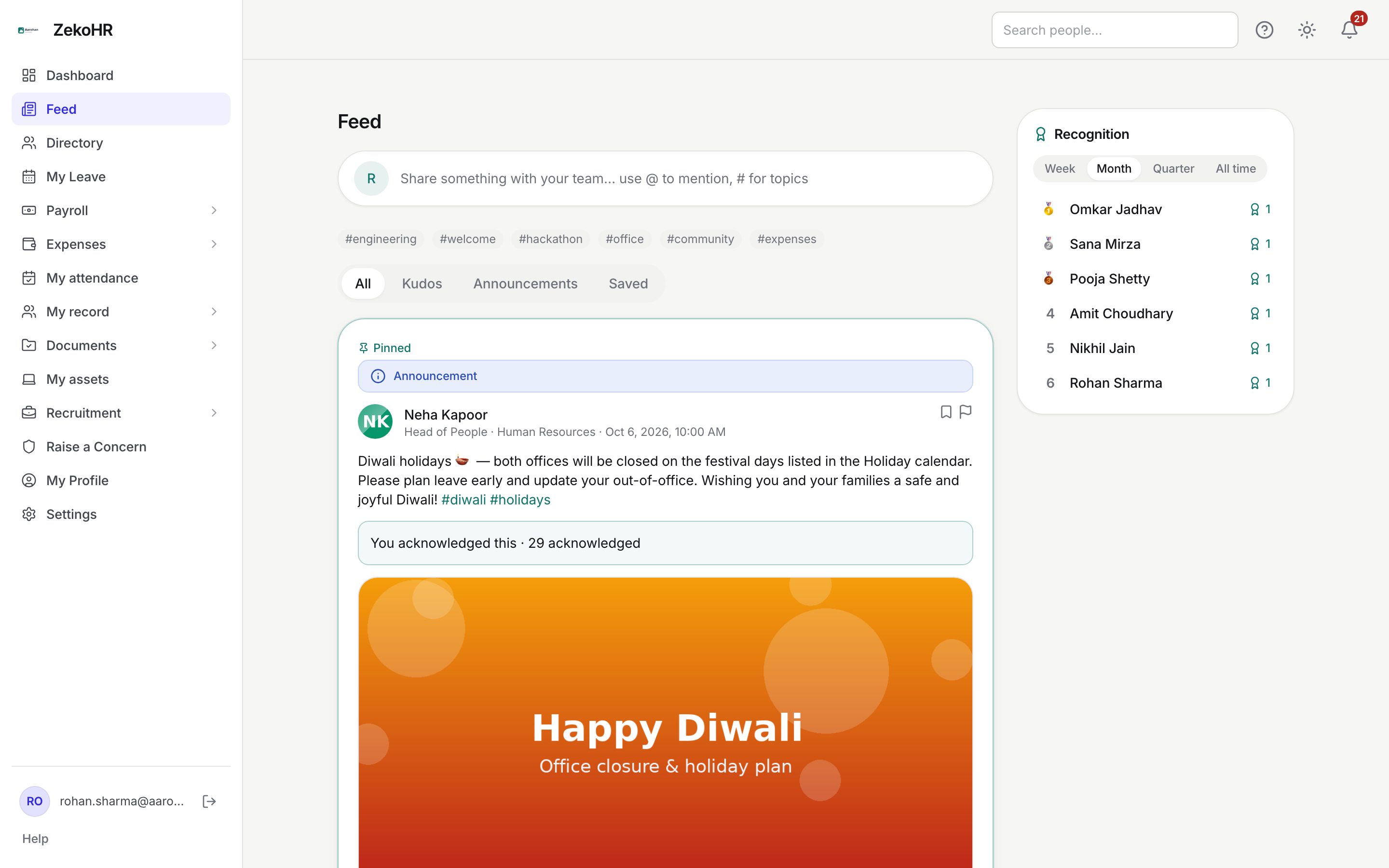
Feed in the sidebar (it sits directly under Dashboard), URL `/feed`. The old `/recognition` link redirects here.
Reading the feed
- Posts are listed newest first, with pinned announcements always at the top. Twenty load at a time; press Load more for older posts.
- The filter pills switch between All, Kudos, Announcements and Saved (posts you bookmarked).
- Trending hashtags appear as grey chips above the filters. ZekoHR counts tags used in the last 30 days and shows the top six.
- On desktop the Recognition leaderboard sits in the right rail; on a phone it collapses into a panel above the feed.
Posting an update
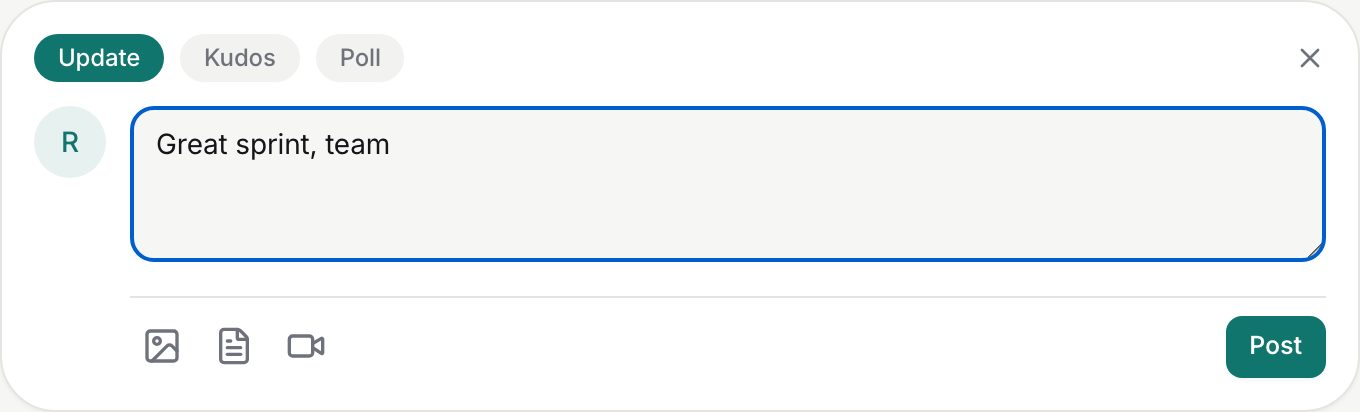
- Click the rounded box that reads Share something with your team…. The composer opens with four type tabs: Update, Kudos, Poll and, for HR and Admins only, Announcement.
- Stay on Update and write your text. Type `@` followed by at least two letters to get a colleague picker, and `#topic` to tag a topic. The body can hold up to 5,000 characters.
- Use the three icons under the text box to attach media:
- Add photo accepts jpg, jpeg, png, webp or gif. Up to 8 images per post.
- Attach file accepts pdf, doc, docx, xls, xlsx, ppt or pptx. Up to 5 files per post.
- Add video accepts one mp4, webm or mov file.
Each file can be up to 50 MB unless the server upload cap was changed. Thumbnails and file names appear under the text; the small cross removes one.
- Click Post. A post needs either text or at least one attachment; an empty one is rejected with "Write something or attach media."
Link previews
If your text contains a web address, ZekoHR fetches the page title, description and image and shows a clickable card under the post. Only the first `http` or `https` link is used, the fetch gives up after five seconds, and private or internal addresses are ignored. Previews apply to updates, kudos and announcements, not polls.
Editing, deleting, saving and reporting
| Action | Where | Who |
|---|---|---|
| Edit (pencil) | Post header | The author, or an HR/Admin moderator |
| Delete (bin) | Post header | The author, or an HR/Admin moderator (they see a confirmation naming the author) |
| Save (bookmark) | Post header | Anyone; the post then appears under Saved |
| Report (flag) | Post header, shown instead of edit/delete on other people's posts | Anyone; a prompt asks why (up to 500 characters) |
Edited posts carry an edited marker. Editing re-reads the hashtags in the new text.
What happens next
- Colleagues you `@mention` get an in-app notification and an email ("social.mentioned" template).
- Hashtags you use feed the trending chips above the filters.
- Attached files are served only to people who can see the post.
- Reports go to the Feed Moderation queue; nothing changes on the post until a moderator acts.
- When a moderator edits or deletes someone else's post, the change is written to the audit log (`social.post.moderated_edit`, `social.post.moderated_delete`). Editing your own post is not audited.
Rules and limits
- Feed audience is set by the Admin in Social → Feed Settings: either one feed per company or one organisation-wide feed. In per-company mode you only see posts from your own company, plus organisation-wide system posts, and the `@` picker only offers colleagues from your company.
- Up to 50 mentions per post. Up to 20 hashtags are indexed per post; a tag is the `#` plus up to 80 letters, digits or underscores and is stored in lower case.
- Posts hidden by a moderator disappear from the feed for everyone and their author can no longer edit them.
- Contractors whose access settings exclude announcements never see announcement posts.
Troubleshooting
I cannot see Feed in the sidebar. Either the Social module is off on your plan or feed access has been removed from your role. Ask an Admin to check Settings → Billing and Settings → Roles & permissions.
My post was rejected as too large. Each file must be under the upload cap (50 MB by default). Compress the video or split the images.
The link card did not appear. The page took longer than five seconds, has no Open Graph tags, or points at an internal address. Only the first link in the text is previewed.
A colleague does not appear in the @ picker. Type at least two characters of their name. In per-company mode only people in your company are listed.
My post vanished. A moderator removed it after a report. Ask HR.