Holiday calendar and restricted holidays
The Holiday Calendar page shows the holidays on your company's calendar for the next twelve months, with a countdown to the next one, followed by a Team schedule of who is on leave. Holidays come from the calendar HR marks as default for your company, so the list is the one used when your leave is counted.
Who can do this: every employee. The team schedule needs one of `calendar.view.any`, `calendar.view.own_company` or `calendar.view.direct_reports`; without any of these you see only your own leave alongside the holidays. The sidebar entry needs the same permission set.
Where to find it
Leave → Holiday Calendar. URL: `/holiday-calendar`. The dashboard hero also shows the NEXT HOLIDAY card with the same countdown.
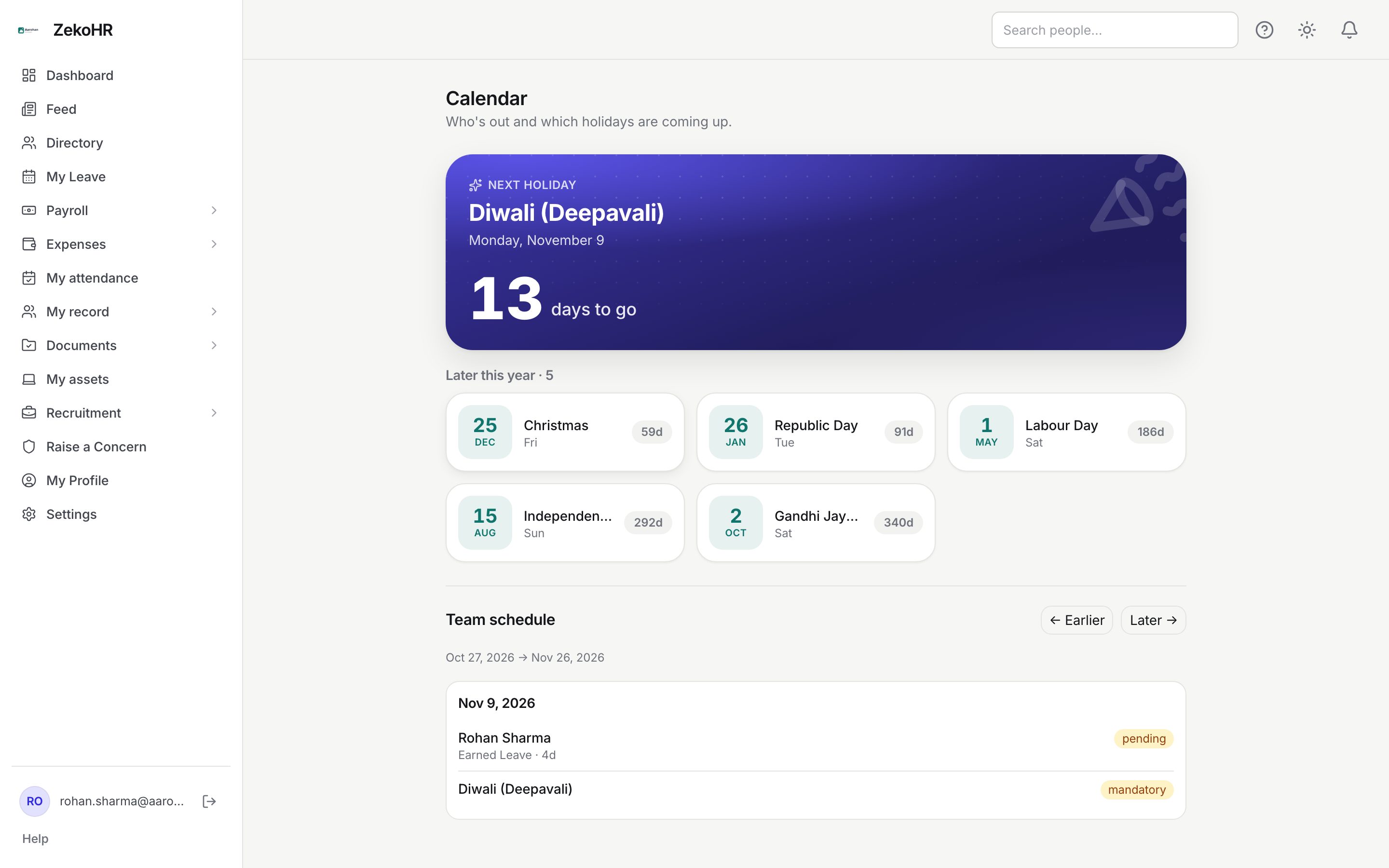
Reading the holiday list
- The hero card names the Next holiday, its date and a large days to go counter. On the day it reads Today; the day before, Tomorrow.
- Later this year · N lists every further holiday in the next 12 months as a card: day and month, name, weekday, and a countdown chip (highlighted when seven days or fewer away).
- The list covers mandatory holidays. Restricted holidays appear further down in the Team schedule with a restricted badge.
- If there is nothing coming up you see "No upcoming holidays".
Reading the team schedule
- Team schedule shows a 30-day window starting today. Use ← Earlier and Later → to move the window by 30 days.
- Entries are grouped by date. A leave entry shows the person's name, the leave type and length ("Earned Leave · 4d"), and a pending or approved badge. A holiday entry shows its name and a mandatory or restricted badge.
- "No leaves or holidays in this window." means the range is empty for the people you are allowed to see.
Who you see is explained in Team calendar.
Mandatory and restricted holidays
| Kind | Effect on your leave | Shows on your calendar |
|---|---|---|
| Mandatory | Never counted as a working day. A leave range spanning it is one day shorter. | Always. |
| Restricted (optional) | Counted as a working day. A leave range spanning it is not shortened. | In the Team schedule, with a restricted badge. |
Restricted holidays are the optional holidays your company lists alongside the mandatory ones. ZekoHR has no screen for choosing them, so none of them is treated as a day off when your leave is counted. If you want to take a restricted holiday, apply for leave on that date in the usual way, or ask HR how your company records it.
What happens next
- Holidays affect how many days a leave request costs: the apply form's working-day count uses your company's working week and the default calendar.
- A holiday added or removed by HR is reflected immediately on this page and in future requests. Requests already approved keep their original day equivalent.
Rules and limits
- Only the default calendar of your company feeds this page. Other calendars HR creates are not shown to employees.
- The holiday list is a rolling 12 months from today; the team schedule can be moved freely but each view is 30 days.
- Leave type names in the team schedule are visible to everyone who can see the entry on this page. The dashboard Who's on leave widget is stricter and hides the type from colleagues.
- This module must be enabled on your plan; Admins can check Settings → Billing.
Troubleshooting
A public holiday is missing. HR has not added it to the company's default calendar, or it is a restricted holiday, which is not in the upcoming list.
The next holiday card is empty on my dashboard. There are no holidays in the next year on your calendar, or your profile has no company set. Ask HR.
My leave request counted a holiday as a day. The date is a restricted holiday, which counts as a working day, or it is on a calendar that is not the default.
I cannot see teammates' leave in the schedule. Your role lacks a calendar permission, or they have restricted who may see their leave.