Team calendar
The Team schedule on the Calendar page and the Who's on leave widget on the dashboard answer the same question: who is away and when. Which people you see depends on your calendar permission and on each colleague's leave visibility setting, so a manager always sees their reports while a colleague may see less.
Who can do this: everyone sees the Calendar page. Breadth of the team schedule comes from `calendar.view.any` (Admin, HR Manager), `calendar.view.own_company`, or `calendar.view.direct_reports` (Manager). With none of these you see only your own leave. The Who's on leave widget is available to every employee and filtered per person.
Where to find it
Leave → Holiday Calendar, section Team schedule. URL: `/holiday-calendar`. The dashboard widget is WHO'S ON LEAVE on `/`.
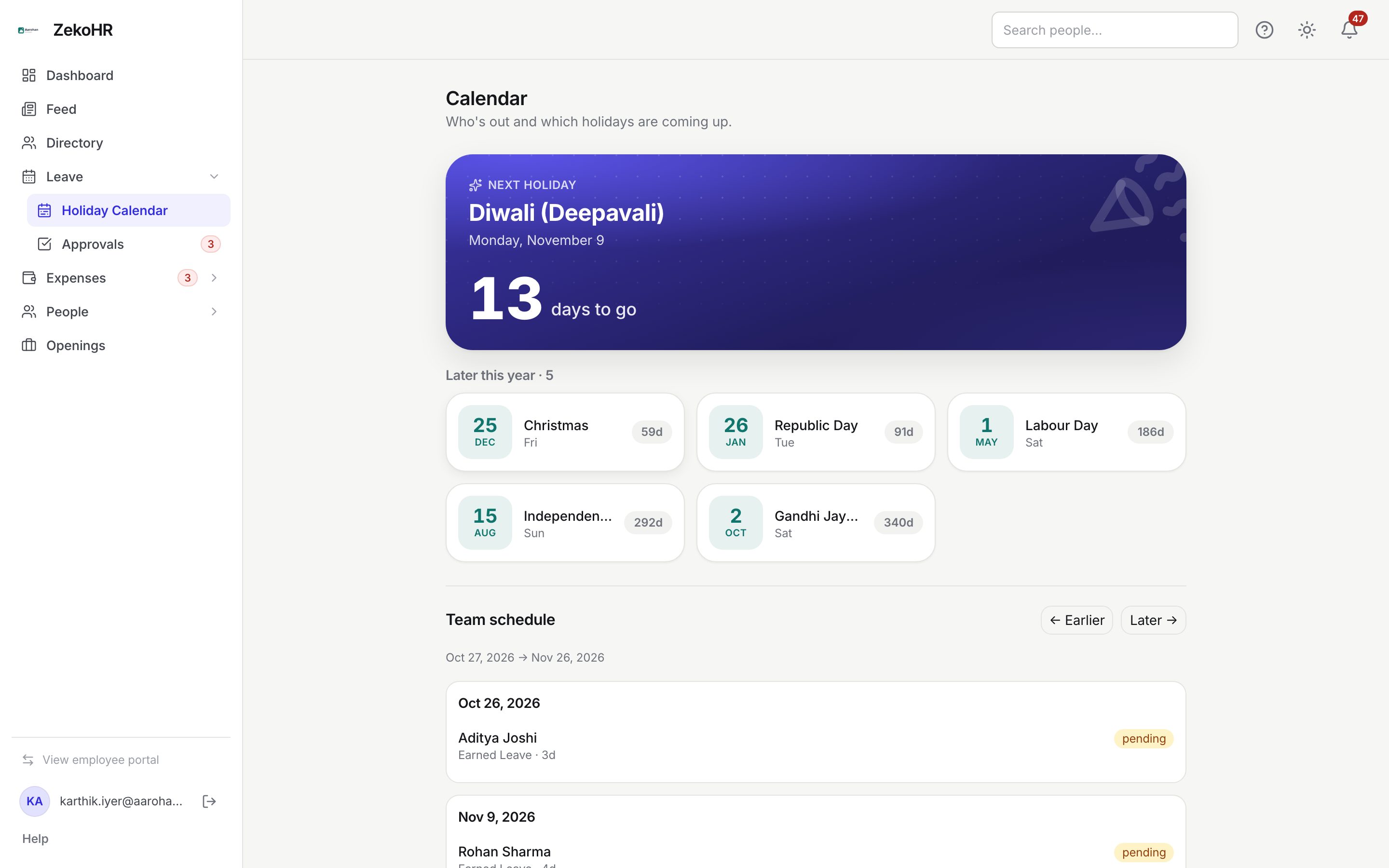
Using the team schedule
- Scroll past the holidays to Team schedule. The range line shows the current 30-day window, starting today.
- Click ← Earlier or Later → to shift the window by 30 days.
- Each date card lists entries. For a person on leave you see their name, the leave type and length, and a pending or approved badge. Holidays are listed in the same cards with a mandatory or restricted badge.
- Pending requests are shown so you can plan around likely absences; they are neither debited nor final until approved.
Using Who's on leave on the dashboard
- The widget opens on Today with a count. Switch to Later this week for the next six days.
- Each row shows the person's photo or initials, name, designation or department, the date range and a chip for partial days: Half day (AM), Half day (PM) or Few hours.
- Colleagues see On leave rather than the leave type. The type is shown only to the person themself, their reporting manager, and HR or Admin users for that company.
- When nobody is out you see "Everyone's in today" with an Open the calendar link.
Who you can see
| Your permission | People in the team schedule |
|---|---|
| `calendar.view.any` | Everyone in the organisation. |
| `calendar.view.own_company` | Everyone in your company, then narrowed by each person's visibility setting. |
| `calendar.view.direct_reports` | Your direct reports and yourself. |
| None | Yourself only, plus the holidays. |
Below `calendar.view.any`, each subject's Leave visibility setting (set by HR on their record) is applied:
| Subject's setting | Who may see their leave |
|---|---|
| Everyone | Anyone in the organisation. |
| Reporting manager & team | Their manager, teammates under the same manager, and their own reports. |
| Specific people | Only the listed viewers. |
Regardless of setting, the person themself, their reporting manager, HR with `leave_requests.view.any` or scoped HR for their company, and Admins always see the leave. Offboarded and inactive people never appear in the widget.
What happens next
- Entries appear as soon as a request is submitted (pending) and update on approval, rejection or cancellation. Rejected and cancelled requests disappear.
- Nothing on these screens sends notifications; they are read-only views.
Rules and limits
- Each view of the schedule is 30 days; use the arrows to move through time.
- Holidays shown in the team schedule come from your own company's default calendar, even when you can see people in other companies.
- Restricted holidays appear with a restricted badge; they still count as working days when leave is calculated.
- Managers keep seeing their direct reports even when a report has set Specific people.
- The widget looks at approved leave only, over today plus six days.
- This module must be enabled on your plan; Admins can check Settings → Billing.
Troubleshooting
A teammate's leave is missing from the schedule. They have restricted their visibility, or your role has no calendar permission beyond your own leave.
I see the person but not the leave type. On the dashboard widget the type is hidden from colleagues by design. The calendar page shows it to anyone allowed to see the entry.
The schedule is empty but I know people are off. You may be looking at the wrong 30-day window; use ← Earlier.
I am a manager and my new report is not listed. Check with HR that you are recorded as their reporting manager on their profile.