Viewing and downloading your payslips
My Payslips lists every payslip HR has published for you, newest first, with the gross and net figures on each row. Opening a row shows the full breakdown of earnings and deductions, and each row has a PDF download. A payslip appears here only after HR publishes the month's payroll run, which is also when you receive the "Your payslip is ready" notification.
Who can do this: every employee with `payroll.view.self` (Employee, Manager, HR Manager, Admin and Accounts roles all have it). Contractors on the invoice track are not on payroll and have no payslips.
Where to find it
Sidebar Payroll → My Payslips, URL path `/my-payslips`. The payslip email links straight to one slip at `/my-payslips?payslip=<id>`. This module must be enabled on your plan; Admins can check Settings → Billing.
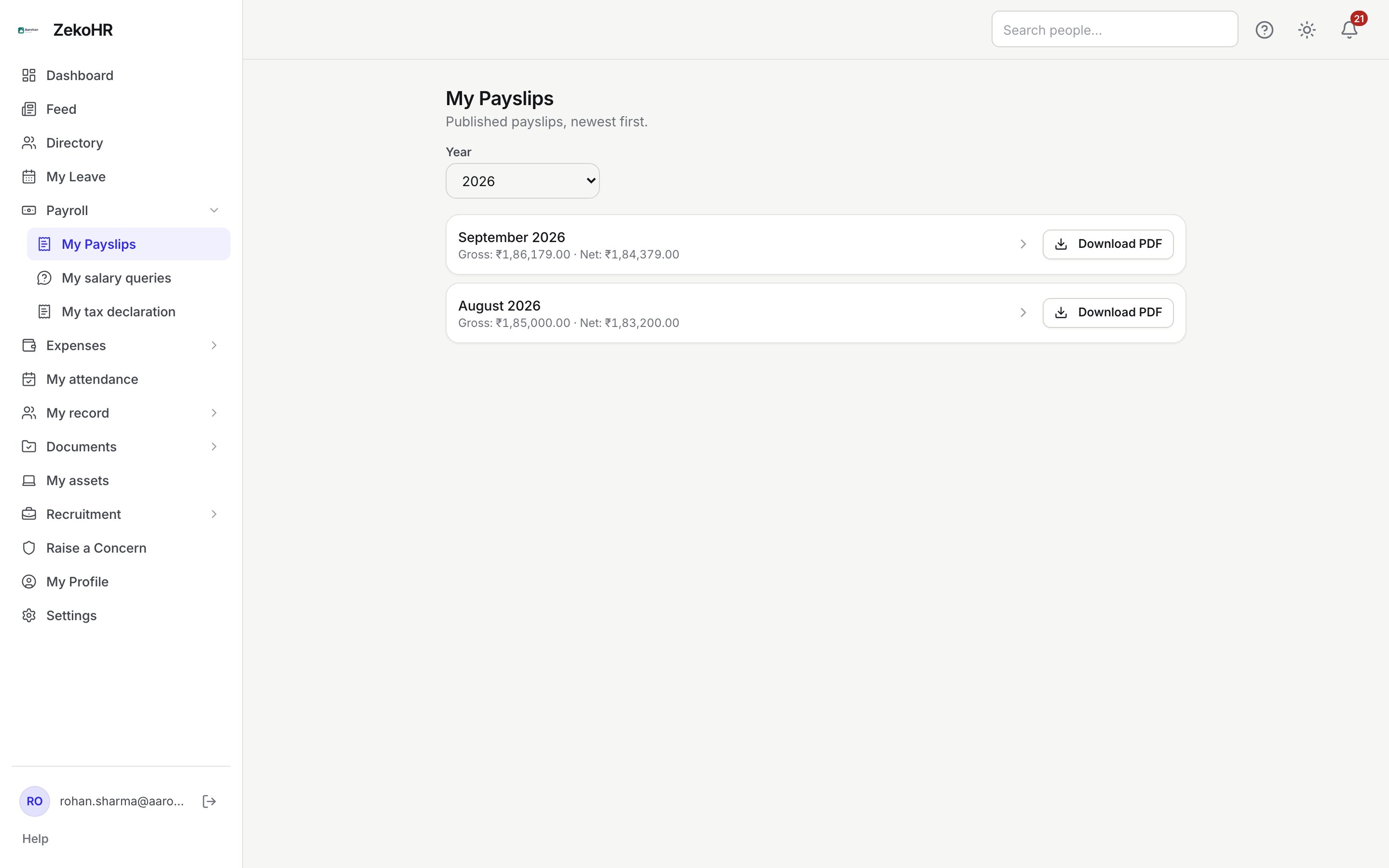
Finding a payslip
- Year defaults to the current calendar year and offers the last six years. Payslips are grouped by the pay period's year, not by the Indian financial year, so January to March of a financial year sit under the next calendar year.
- Each row shows the period (for example September 2026), Gross and Net, formatted in your company's currency.
- Click the row to open the breakdown. Click Download PDF to save the file as `payslip-<period>.pdf`.
- If nothing is listed you see No payslips yet. They appear here once HR publishes a payroll run.
Reading the breakdown
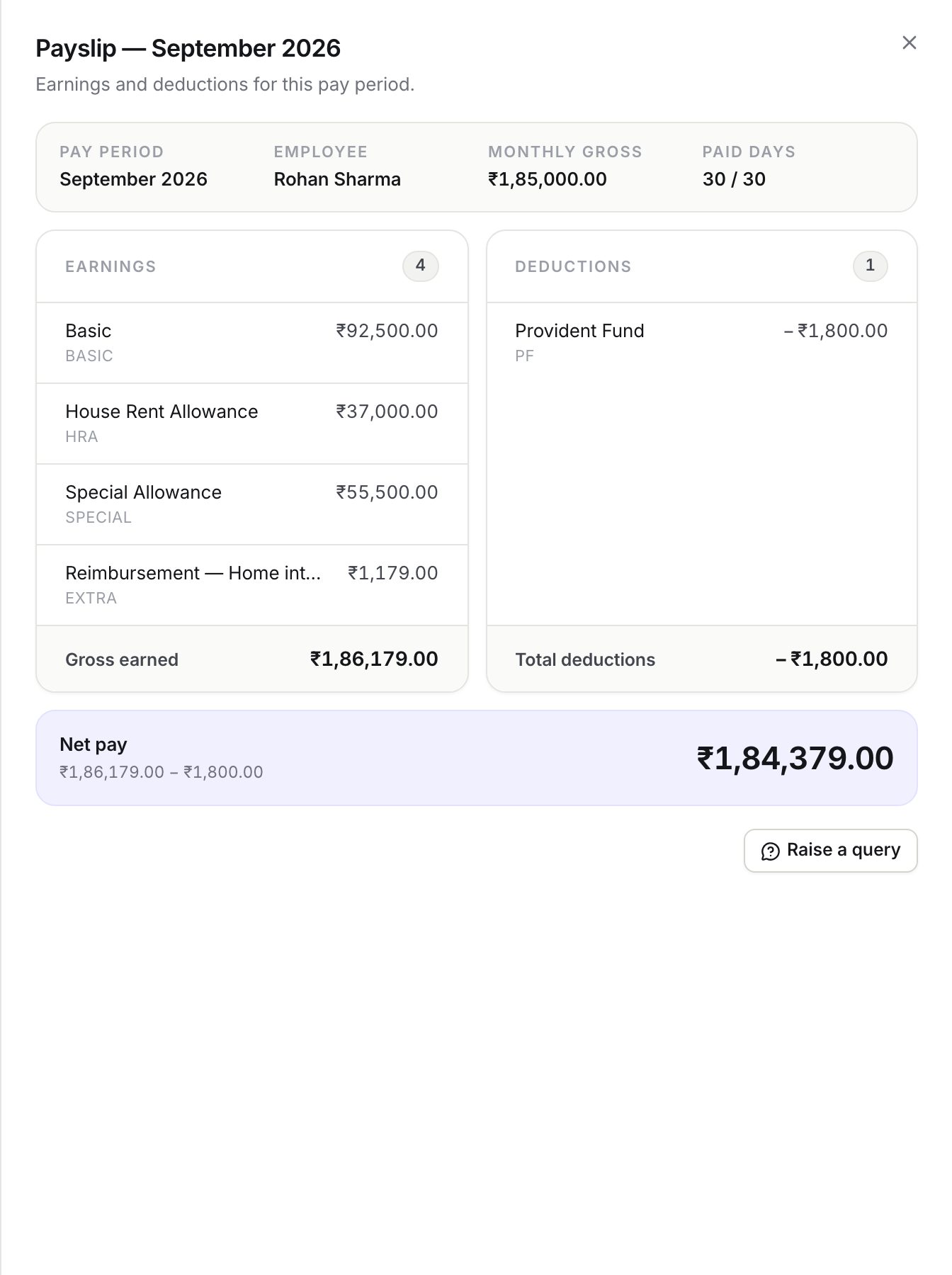
The dialog is titled Payslip. <period> and has four parts:
| Part | What it shows |
|---|---|
| Header | Pay period, Employee, Monthly gross (your assigned full-month gross) and Paid days as paid / calendar days, for example 30 / 31 |
| Earnings | Each earning line with its code; Gross earned is the total after proration |
| Deductions | Each deduction line, shown with a leading minus; Total deductions at the foot |
| Net pay | Gross earned minus total deductions, with the two figures printed under it |
A line marked adjusted was set to a manual amount by HR instead of the structure's computed value. A line whose code reads EXTRA was added by hand for that month only, for example a one-off bonus or a reimbursement line named Reimbursement. <claim title> pushed from an approved expense claim. If HR left a note on the payslip, it appears under the net pay banner.
Below the breakdown is Raise a query, which opens a salary query about this exact payslip. See Raising a salary query.
What the PDF contains
The PDF is generated when HR finalizes the run and mirrors the breakdown: company name, period, your name, designation, department and joining date, your PAN and UAN, your bank account number with all but the last four characters masked, bank name, days in month, LOP and paid days, then the earnings and deductions ledger and net pay. PAN and UAN are printed in full. Statutory items such as PF, ESI, professional tax and TDS appear only if HR added them as deduction components; ZekoHR does not calculate statutory amounts itself.
What happens next
- When HR publishes a run you get an in-app notification and an email ("Your payslip is ready") with the net amount and a link to the slip.
- If HR later rolls the run back to correct something, the payslip disappears from this page and the PDF is deleted. It returns, and you are notified again, when the corrected run is published.
- Nothing you do on this page changes any record or notifies anyone.
Rules and limits
- Only payslips from published runs are listed. Draft and finalized runs are visible to HR only.
- The PDF link returns "not found" until the file has been generated, usually within a minute of publishing.
- Amounts use the currency set on your company (INR unless an Admin changed it); there is no conversion.
- Paid days are based on calendar days in the month, so a month with 1 LOP day in October gives 30 / 31.
Troubleshooting
My payslip for last month is missing. HR has not published that run yet, or the run was rolled back for correction. Ask HR; a general salary query of type Payslip not available reaches them with no payslip attached.
Download PDF says not found. The PDF is still being generated. Wait a minute and try again. If it persists, tell HR.
The gross on the payslip is lower than my monthly gross. Look at Paid days. LOP days reduce every prorated earning by paid days divided by calendar days. Compare with My attendance.
My bank account looks wrong on the PDF. Only the last four characters are shown. If those are wrong, request a change under My record → My change requests; see Your payroll profile and bank details.