Cancel or change a leave request
A leave request cannot be edited once submitted. To change the dates, type or mode you cancel it and apply again. Pending requests can be cancelled any time; approved leave can be cancelled only while it is still in the future. Cancelling approved leave refunds the days to your balance immediately.
Who can do this: employees with `leave_requests.cancel.self` on their own requests. HR and Admins with `leave_requests.cancel.any` can cancel anyone's request, including approved leave that has already started.
Where to find it
Leave → My Leave, tabs Pending and Approved. URL: `/my-leave` and `/my-leave?tab=approved`.
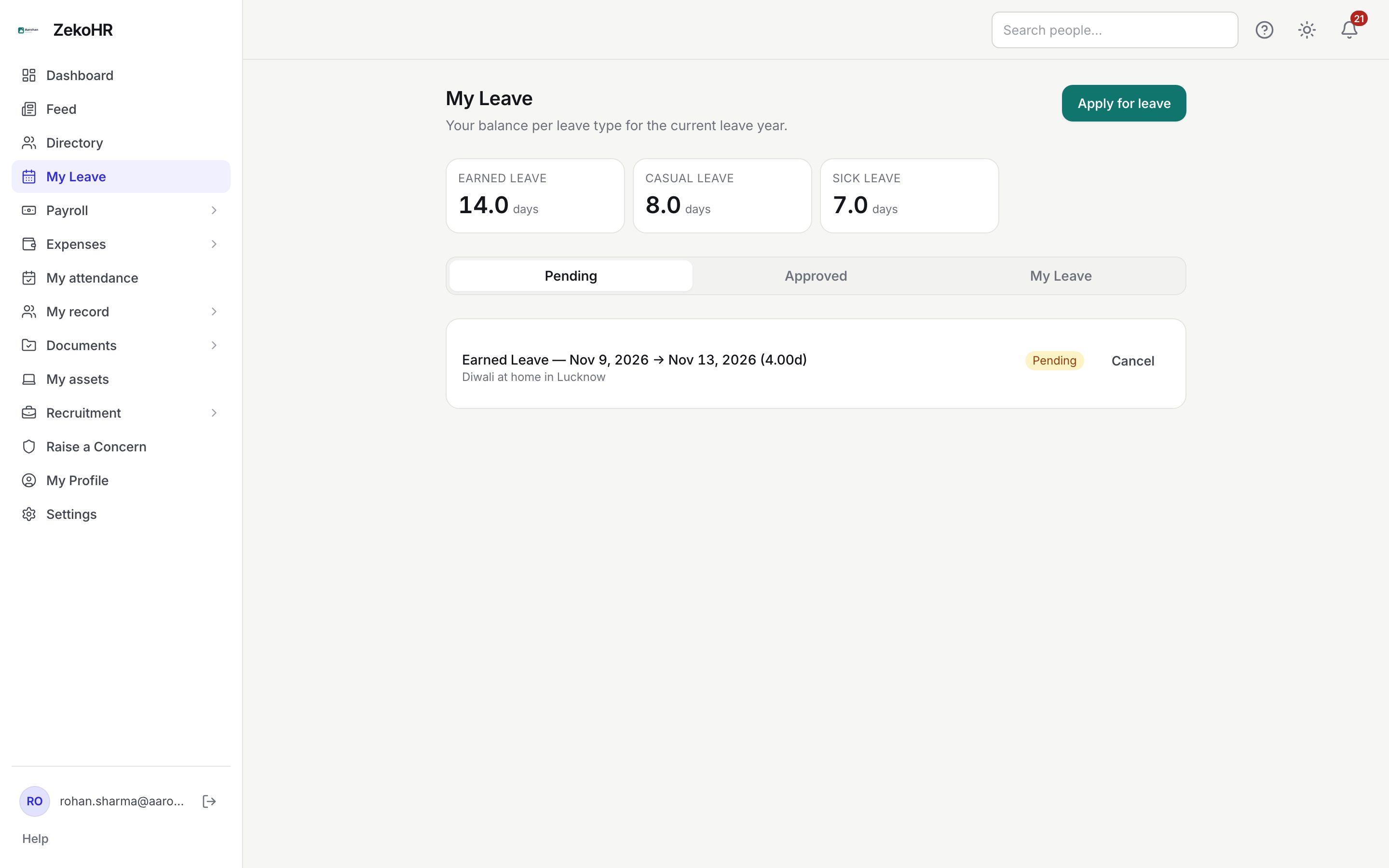
Cancelling a pending request
- Open My Leave. The Pending tab lists requests still awaiting a decision, newest start date first.
- Each row shows the leave type, dates, day equivalent (for example "4.00d"), your reason and a Pending badge.
- Click Cancel on the row. The request moves to Canceled straight away. There is no confirmation dialog.
- Nothing was debited, so your balance does not change. The amount that was held against Available is released.
Cancelling approved leave
- Switch to the Approved tab.
- A Cancel button appears only on leave whose start date is after today.
- Click Cancel. The days are refunded to the same leave year, your balance rises by the full day equivalent and the request is marked Canceled.
- For comp-off, the credits consumed by the request are returned to available.
Approved leave that has already started shows no Cancel button. Ask HR: they can cancel it from Leave Records, which refunds the full amount, or they can adjust your balance manually.
Changing a request
There is no edit screen. To move dates or switch type:
- Cancel the existing request as above.
- Click Apply for leave and submit the new dates. The overlap check only looks at pending and approved requests, so the cancelled one will not block you.
- If the original was approved, the new request goes back to your manager for a fresh decision.
Statuses
| Status | Meaning | What happens next |
|---|---|---|
| Pending | Waiting for your manager or HR. | Approve, reject, or you cancel. |
| Approved | Debited from your balance; on the calendar. | You can cancel if it has not started. |
| Rejected | Declined; the decision reason shows on the row as "Reason: …". | Apply again with different dates if needed. HR can still override-approve it. |
| Canceled | Withdrawn by you or HR. | No further action; a refund was posted if it had been approved. |
What happens next
- A "leave canceled" notification is sent to you as the request owner, naming who cancelled it and any comment. When HR cancels on your behalf, that is how you learn of it.
- A refund row (reason "Leave refunded") is written to your ledger for approved leave, visible to HR under your Leave Allocation → History.
- The cancellation is recorded in the audit log with the actor.
- Your manager's approvals queue drops the request if it was pending.
Rules and limits
- Only pending or approved requests can be cancelled. Rejected and already-cancelled ones cannot.
- Approved leave that has already started can only be cancelled by HR.
- The refund always equals the original day equivalent, even when HR cancels leave that was partly taken. HR can post a manual adjustment to correct the difference.
- Cancelling does not remove the leave from your request history; it stays with the Canceled status.
- Managers cannot cancel their reports' requests; they can only approve or reject pending ones. Cancelling someone else's leave needs `leave_requests.cancel.any`.
Troubleshooting
I see no Cancel button on my approved leave. The start date is today or in the past. Contact HR.
I cancelled and the balance did not change. The request was pending, so nothing had been debited. Pending amounts only affect the Available figure on the apply form.
"Could not cancel this request." The request may already have been decided or cancelled elsewhere. Refresh the page.
I need to shorten approved leave by a day. Cancel it and reapply for the shorter range, or ask HR to cancel and adjust.