Raising a concern
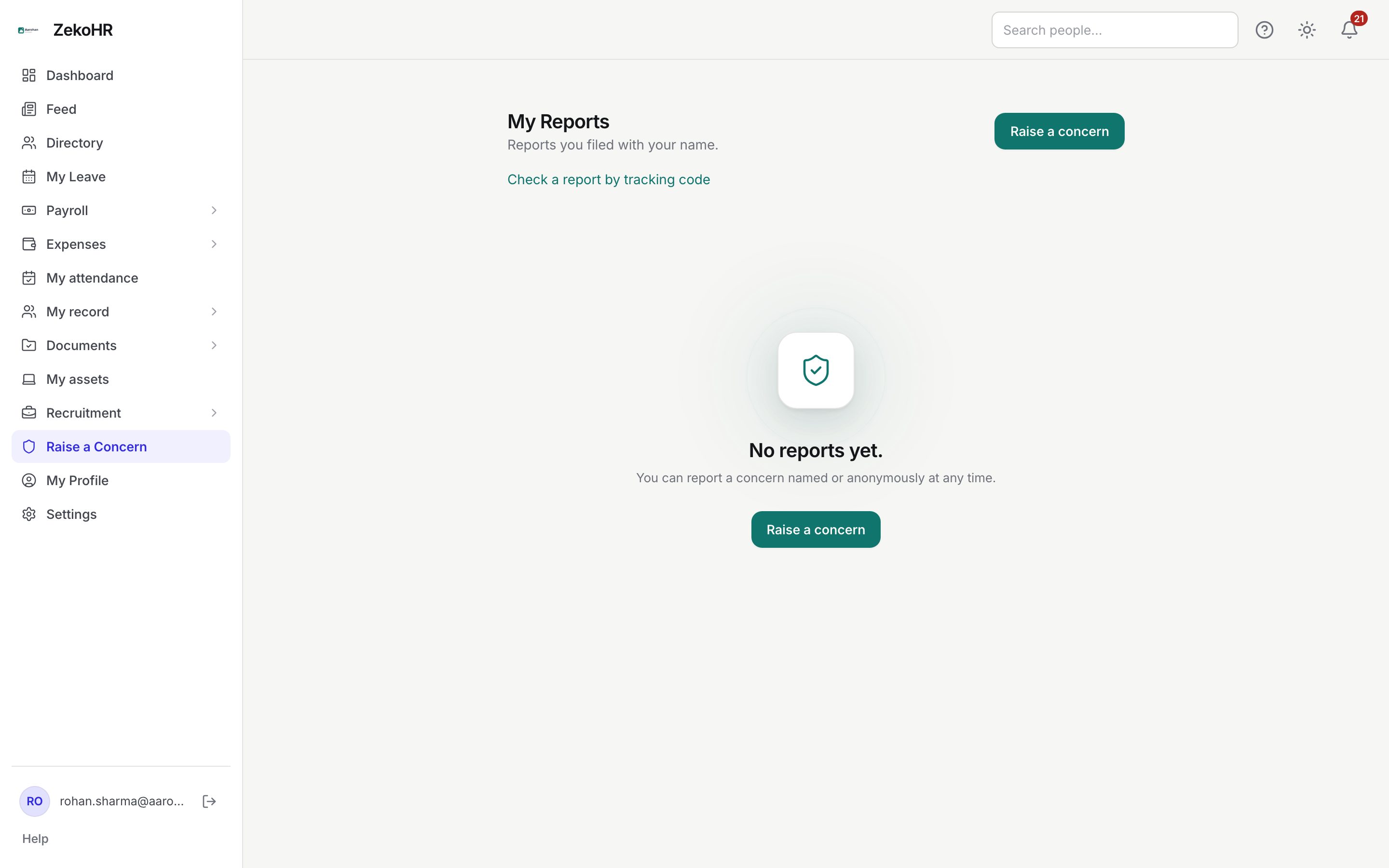
Raise a Concern is ZekoHR's grievance and whistleblower channel. You can describe what happened, name the people involved, attach evidence and tell HR if you fear retaliation. You choose whether the report carries your name or is anonymous; either way you receive a secret tracking code to follow its progress. Only HR and Admin case handlers can read reports, never your manager.
Who can do this: Every employee, manager, contractor or other user with `grievances.report.self` (in every default role bundle). Handling is restricted to `grievances.view.*` and `grievances.manage.*`, which only HR Manager and Admin hold. This module must be enabled on your plan; Admins can check Settings → Billing.
Where to find it
Raise a Concern in the sidebar (inside the Grievances group in the admin view), URL `/my-grievances`. The form itself opens at `/report-grievance` from the Raise a concern button.
Filing a report
- On My Reports click Raise a concern.
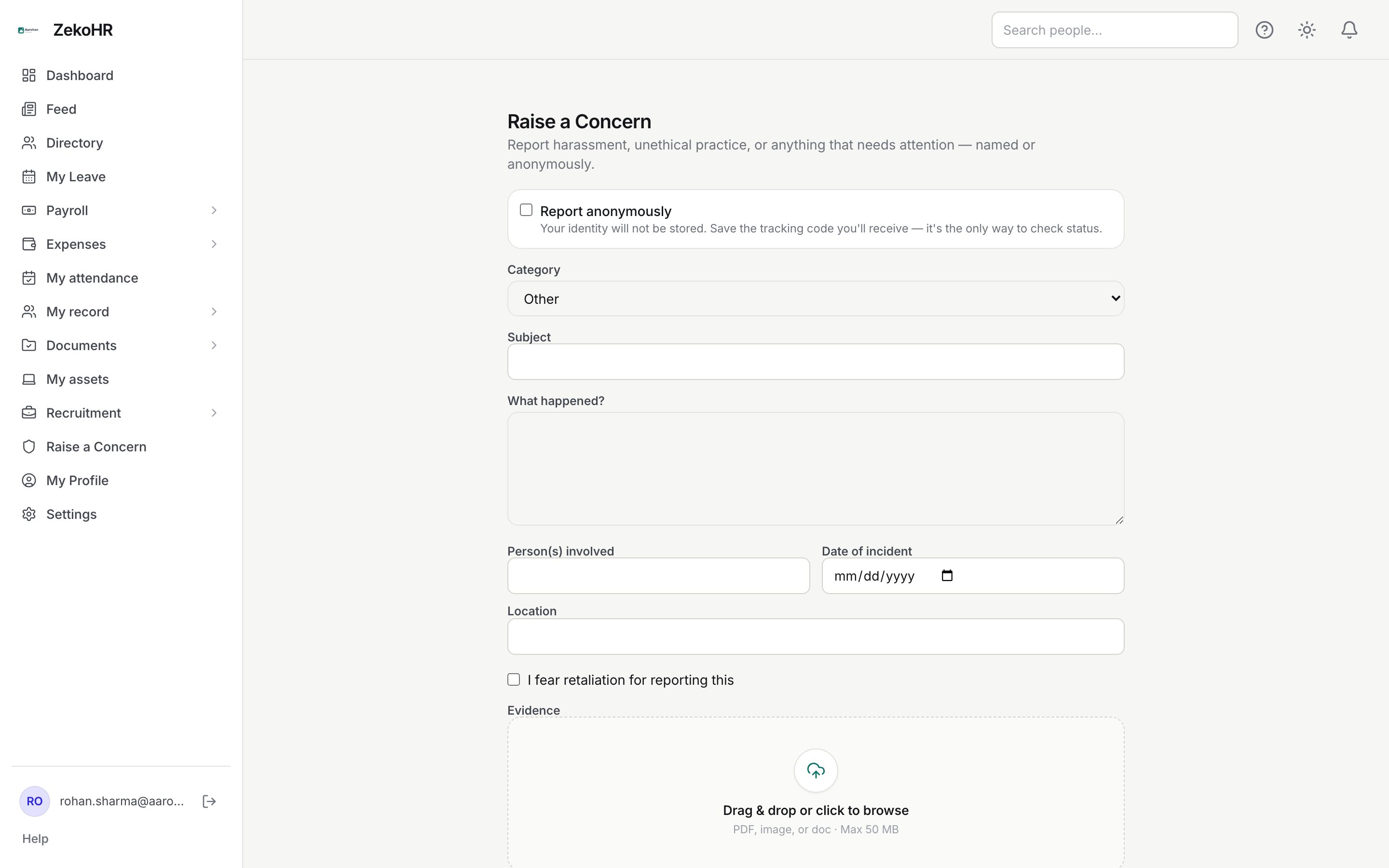
- Decide on anonymity. Tick Report anonymously if you do not want your identity stored. The hint explains the trade-off: ZekoHR keeps no link between you and the report, so the tracking code you receive is the only way to check on it, and you will get no notifications.
- Pick a Category: Harassment / PoSH, Fraud / Unethical practice, Discrimination, Safety, Data / Privacy, Retaliation or Other (the default).
- Enter a Subject (required, up to 255 characters).
- Under What happened? describe the incident (required, up to 5,000 characters).
- Optionally fill Person(s) involved (up to 255 characters), Date of incident and Location (up to 255 characters).
- Tick I fear retaliation for reporting this if that applies. Handlers see a prominent warning and are told to handle the case with extra confidentiality.
- Under Evidence, drop or pick files: PDF, images (jpg, png, webp), doc or docx, up to 10 files, each up to 50 MB by default. File names are listed under the dropzone.
- Click Submit report.
After submitting
The Report received screen shows your Tracking code, a ten-character code such as `CEGPOTUN3P`. Write it down before leaving the page; for an anonymous report it is never shown again. Two buttons follow: My Reports (named reports only) and Check status.
My Reports
Named reports are listed newest first with the subject, status badge, category, filing date and tracking code. Once a case is resolved or dismissed, the handler's resolution note appears in a grey box under it. Anonymous reports are deliberately absent from this list; use Check a report by tracking code.
Statuses
| Status | Meaning | What happens next |
|---|---|---|
| Open | Filed, awaiting a handler | A handler starts review |
| In review | A handler is working on it | Handler resolves or dismisses with a note |
| Resolved | Closed with an outcome | Note is visible to you; nothing further |
| Dismissed | Closed without action | Note explains why |
What happens next
- Every HR Manager and Admin who holds a grievance view permission in your organisation receives an email and an in-app notification that a report in that category was filed, with the tracking code. The email never includes your name or the description.
- If you filed with your name, each status change sends you an email and in-app notification. Anonymous reports send nothing; check the code instead.
- The submission is recorded as the first entry in the case history. Nothing is written to your employee timeline, and your manager is not involved.
Rules and limits
- Anonymous means ZekoHR keeps no record of who filed the report. It does not log the device or network address against the report, but anonymity is procedural, not cryptographic: details you type can still identify you.
- The report is attached to your company (HR Managers handle cases for the companies in their HR scope; Admins see everything).
- There is no messaging thread between you and the handler. If you have more to add, file a follow-up report quoting the original tracking code.
- A report cannot be edited or withdrawn after submission.
Troubleshooting
I lost my tracking code for an anonymous report. It cannot be recovered. File the report again if you need status updates.
My anonymous report is not on My Reports. By design. Use the tracking code page.
I cannot see Raise a Concern. The Grievances module is off on your plan, or raising concerns has been removed from your role.
My evidence upload failed. Check the file type (PDF, jpg, png, webp, doc, docx) and size (50 MB per file by default), and that you added no more than ten files.
Can my manager see this? No. Managers can file reports but hold no view or manage permission.