Pay components and payroll setup
Before you can run payroll for a company you need three things: the company's currency, a catalog of pay components (the earnings and deductions a payslip can contain) and at least one salary structure built from them. This article covers the first two. Everything is per company, so a group with two legal entities sets up each one separately.
Who can do this: Admins with `payroll.manage.any`, HR Managers with `payroll.manage.assigned_companies` for their companies. `payroll.view.*` lets you see the catalog without editing it.
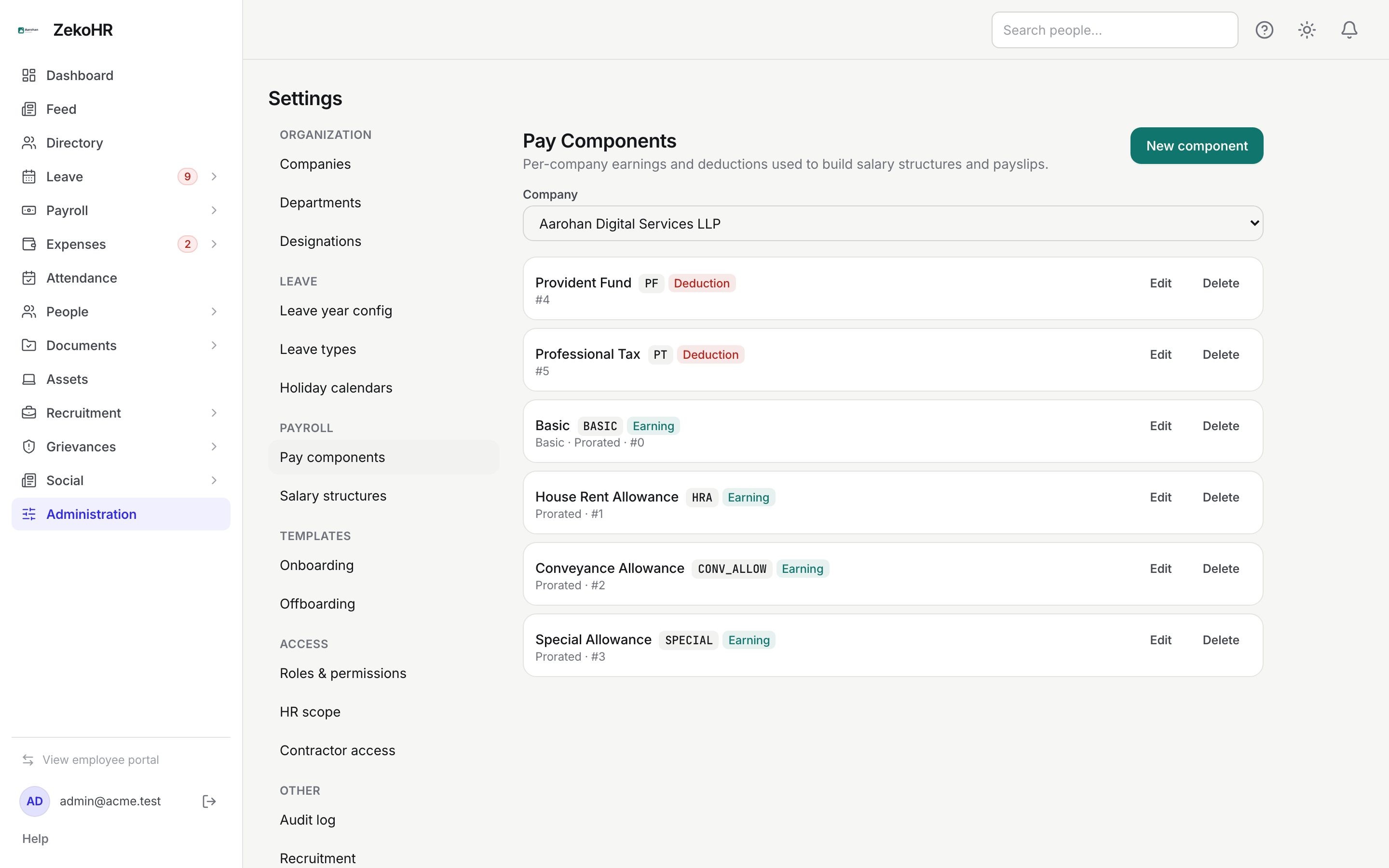
Where to find it
Sidebar Administration → Settings → Payroll → Pay components, URL path `/settings/payroll/components`. The company currency is under Administration → Settings → Companies. This module must be enabled on your plan; Admins can check Settings → Billing.
Step 1: currency
In Settings → Companies, edit the company and set its three-letter currency code (INR by default). Every payslip, register and payroll screen for that company is formatted in it. There is no conversion between currencies.
Step 2: creating a pay component
- Pick the Company from the dropdown at the top of the page.
- Click New component.
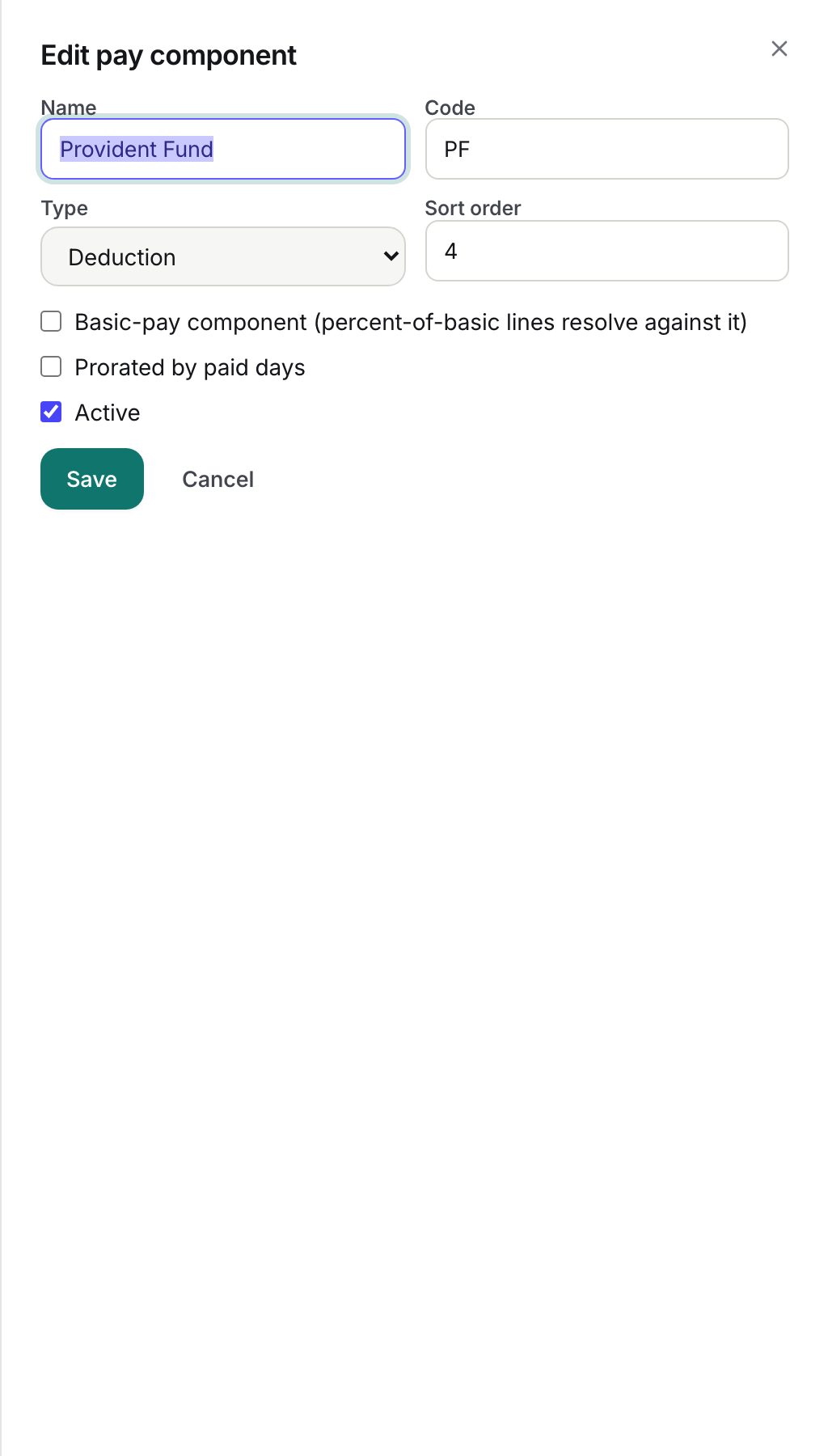
- Name: required, up to 120 characters, as it will print on payslips (for example "House Rent Allowance").
- Code: required, up to 16 characters, automatically upper-cased, unique within the company (for example HRA). The code is the column heading in the register CSV, so keep it short and stable.
- Type: Earning or Deduction. Switching type resets the prorated flag to its default.
- Sort order: a whole number from 0; lower numbers appear first within their type on structures and payslips.
- Basic-pay component (percent-of-basic lines resolve against it): tick on exactly one earning per company, normally Basic. Structure lines of type "% of basic" are calculated from the line that uses this component.
- Prorated by paid days: ticked by default for earnings, unticked for deductions. A prorated component shrinks when an employee has LOP days (paid days divided by calendar days). Leave it off for fixed deductions such as professional tax.
- Active: untick to hide the component from new structure lines while keeping history intact.
- Click Save.
Statutory components are manual
ZekoHR does not calculate PF, ESI, professional tax or TDS. Create each one as a Deduction component (for example PF, ESI, PT, TDS) and give it a value in the salary structure, or set the amount per payslip with a line override during review. Keep them non-prorated unless your policy scales them with LOP. The employee's PAN, UAN and ESIC number are stored on their payroll profile for your reference only.
A typical Indian catalog
| Name | Code | Type | Basic | Prorated |
|---|---|---|---|---|
| Basic | BASIC | Earning | yes | yes |
| House Rent Allowance | HRA | Earning | no | yes |
| Conveyance Allowance | CONV_ALLOW | Earning | no | yes |
| Special Allowance | SPECIAL | Earning | no | yes |
| Provident Fund | PF | Deduction | no | no |
| Professional Tax | PT | Deduction | no | no |
| TDS | TDS | Deduction | no | no |
Editing and deleting
- Edit opens the same dialog. You cannot change the Type of a component that is already used by a structure or a payslip; the save is refused.
- Delete removes a component that nothing references. If it is referenced, the request is refused with "Deactivate it instead" and, for Admins (or anyone with `roles.manage`), an override prompt. Confirming the override does not delete; it marks the component inactive so existing structures and payslip history stay intact.
What happens next
- Creating, updating, deleting and force-deactivating each write an audit log entry.
- New companies created from the setup wizard receive an India baseline catalog automatically; you only need to adjust it.
- Payslip lines store a snapshot of the component name, code and type at the time of calculation, so renaming a component later never rewrites old payslips.
Rules and limits
- Codes are unique per company, not per organisation; two companies can both have HRA.
- Only active components are offered when building structure lines; existing lines on inactive components keep working.
- HR Managers see and edit only companies in their HR scope.
- There is no bulk import of components.
Troubleshooting
The page says No companies yet. Create a company under Settings → Companies first.
I cannot change a component from Earning to Deduction. It is already used. Create a new component with the right type and deactivate the old one.
% of basic lines are refused when I build a structure. No line in that structure uses a component flagged Basic with a flat or % of gross value. Tick the Basic flag on your Basic component.
Delete asks me to confirm a consequence. The component is in use. Confirming deactivates it instead of deleting.