Recruitment overview
Recruitment is ZekoHR's applicant tracking system. A hiring manager raises a requisition, HR approves it into an opening, candidates enter a searchable talent pool, and each application moves across a Kanban board through screening, interviews, offer and pre-joining until the person joins as an employee or Contractor. Every email to a candidate is sent from the portal and kept on their history.
Who can do this: Admins with `recruitment.manage.any` and HR Managers or Recruiters with `recruitment.manage.assigned_companies` run hiring. Managers raise requisitions with `recruitment.requisitions.create`. The Management role sees the dashboard with `recruitment.dashboard.view.any` and exports with `recruitment.reports.export`. Everyone refers with `recruitment.refer.self`. Settings need `recruitment_settings.manage`. This module must be enabled on your plan; Admins can check Settings → Billing.
Where to find it
The Recruitment group in the sidebar. The dashboard is Recruitment → Dashboard at `/recruitment`. Every recruitment page carries the candidate search box at the top (HR only).
The screens
| Sidebar entry | Path | What it does |
|---|---|---|
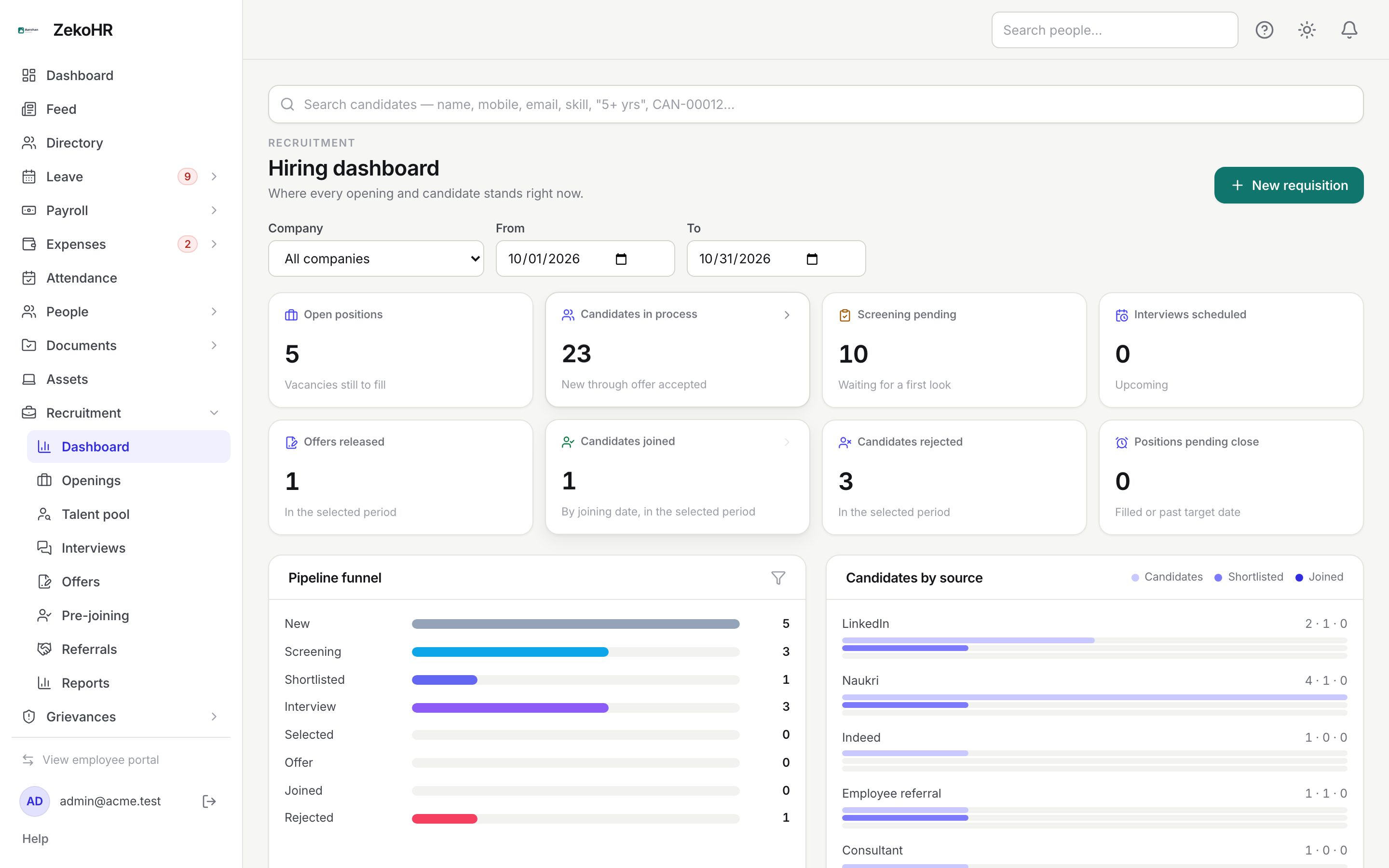
| Dashboard | `/recruitment` | KPI cards, funnel, source bars, upcoming interviews, positions pending close, overdue feedback. |
| Openings | `/recruitment/jobs` | Requisitions and openings, with the Kanban board on each job. See Jobs and openings. |
| Talent pool | `/recruitment/candidates` | Every candidate ever added, with filters and smart search. See Candidates and applications. |
| Interviews | `/recruitment/interviews` | Day-by-day agenda of every interview. See Interviews and scorecards. |
| Offers | `/recruitment/offers` | All offers by status, plus Awaiting my approval. See Offers and approvals. |
| Pre-joining | `/recruitment/prejoining` | Accepted candidates, their document checklist and BGV. See Pre-joining. |
| Referrals | `/recruitment/referrals` | Employee referrals and their rewards. See Referrals. |
| Reports | `/recruitment/reports` | Source effectiveness and the MIS export. See Recruitment reports. |
| My interviews, My openings, Offer approvals | personal | Appear only for people who are a panelist, a hiring manager or a named offer approver. |
| Refer a candidate | `/refer` | Every employee's referral page. |
Reading the dashboard
- Pick a Company (only shown when you can see more than one) and a From / To range. The range defaults to the current month.
- Each card links to the filtered list behind it. Management users with dashboard-only access see the numbers but cannot open the HR worklists.
- Pipeline funnel counts applications by stage category. Click a row to open the talent pool filtered to that stage.
- Candidates by source shows three bars per source: candidates added, shortlisted and joined.
- Upcoming interviews lists the next five. Positions pending close lists open or on-hold jobs that are filled or past their target closing date. Overdue feedback counts panel scorecards more than a day late.
| Card | How it is counted |
|---|---|
| Open positions | Vacancies still to fill across open jobs (vacancies minus filled). |
| Candidates in process | Applications from New through Offer accepted, including On hold. |
| Screening pending | Applications in New or Screening. |
| Interviews scheduled | Scheduled interviews from now onwards. |
| Offers released | Offers sent, accepted, declined or expired in the period. |
| Candidates joined | Applications whose joining date falls in the period. |
| Candidates rejected | Applications rejected in the period. |
| Positions pending close | Open or on-hold jobs that are filled or past the target date. Nothing closes automatically. |
HR also sees a dismissible banner until the Offer letter template has been reviewed, because offers cannot be released with an unreviewed letter.
What happens next
Every write in the module is audited. In-app and email notifications go out for requisition decisions, interview assignments, submitted feedback, offer approvals and responses, joined candidates and referral updates. ZekoHR runs its automatic checks daily: offers expire at 00:20, offer reminders go out at 09:00 and referral reward eligibility is updated at 03:40; interview and feedback reminders are checked hourly.
Rules and limits
- HR Managers only see companies in their HR scope. Without an assignment a warning tells them to ask an Admin for Settings → HR scope.
- Hiring managers, panelists and offer approvers get access by relationship, not by role: they see only the jobs, interviews or offers they are attached to.
- Hiring managers never see salary, offer details or candidate emails; panelists see only a candidate summary and resume.
- The talent pool is organisation-wide; jobs, applications and offers belong to a company.
Troubleshooting
I only see Refer a candidate under Recruitment. You have no manage permission and no recruitment relationship yet. Ask HR to make you a hiring manager, panelist or approver, or an Admin to change your role.
The dashboard cards are not clickable. You have dashboard-only access (Management). Opening the worklists needs a manage permission.
Nothing in the sidebar mentions Recruitment. The module is not on your plan. Admins can check Settings → Billing.