Handling salary queries
Salary queries is the HR queue for pay questions employees raise, either against one published payslip or about pay in general. Unanswered queries sit at the top, oldest first, so the longest-waiting dispute is always the first row. You answer inline in the thread; the employee is emailed your response and can reply or close.
Who can do this: users with `payroll_queries.manage` (Admin and HR Manager by default). Which companies you see is decided by your payroll view scope: `payroll.view.any` sees the whole organisation, `payroll.view.assigned_companies` only assigned companies.
Where to find it
Sidebar Payroll → Salary queries, URL path `/payroll/queries`. The "new salary query" email links to `/payroll/queries?query=<id>`, which opens that thread. An employee's own queries are also listed on People → Employees → open a person → Payslips tab. This module must be enabled on your plan; Admins can check Settings → Billing.
Working the queue
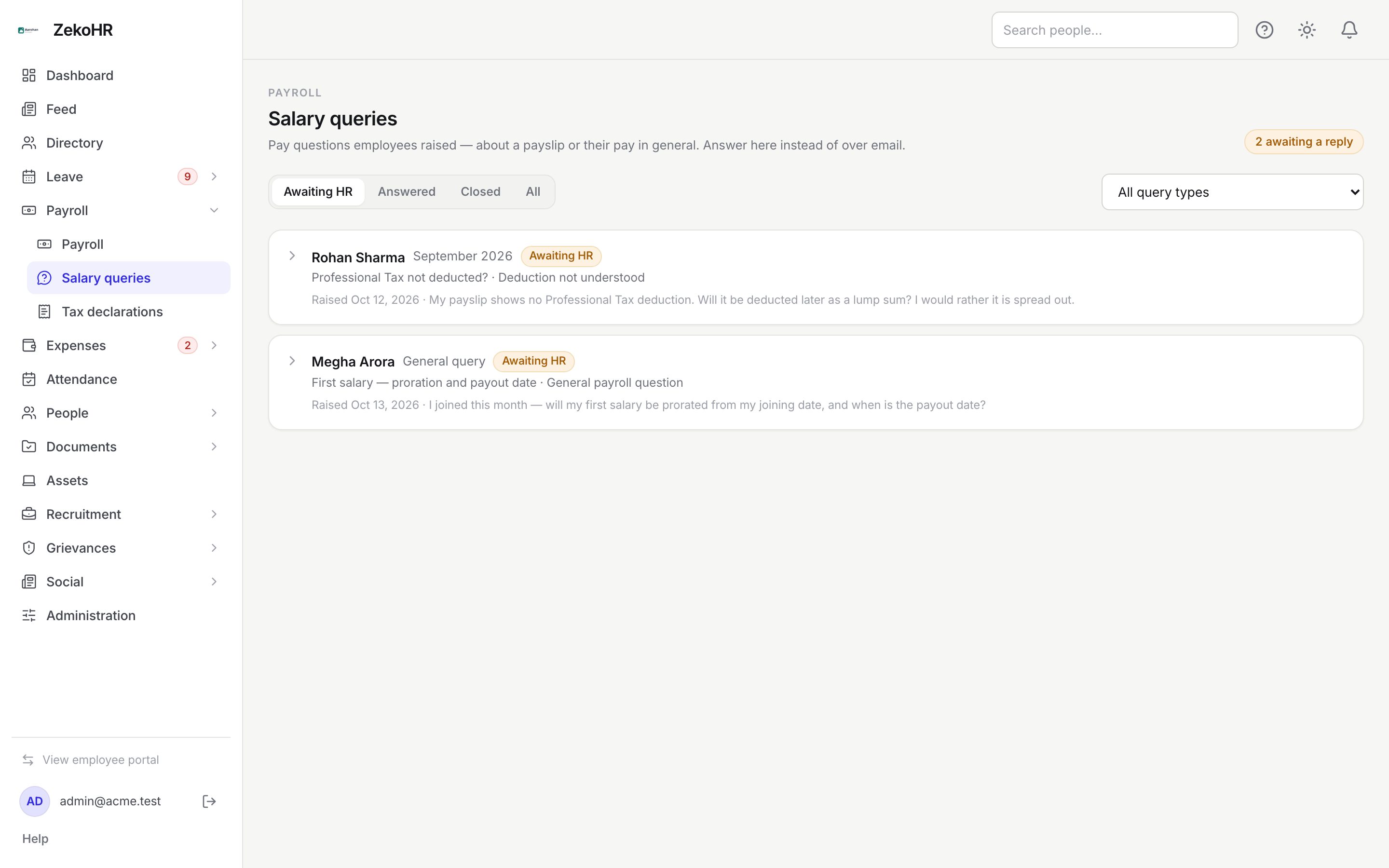
- The status filter defaults to Awaiting HR. Switch to Answered, Closed or All as needed. The badge at the top right counts open queries in the current list.
- Use the All query types dropdown to narrow by type: Net or gross amount looks incorrect, Deduction not understood, A pay component is missing, Tax / TDS question, Bank account or payment not received, Salary structure / CTC, Payslip not available, General payroll question, Something else.
- Each card shows the employee, the period (or General query), the status badge, subject and type, the date raised and the first line of the description. Click the card to expand the thread.
Answering
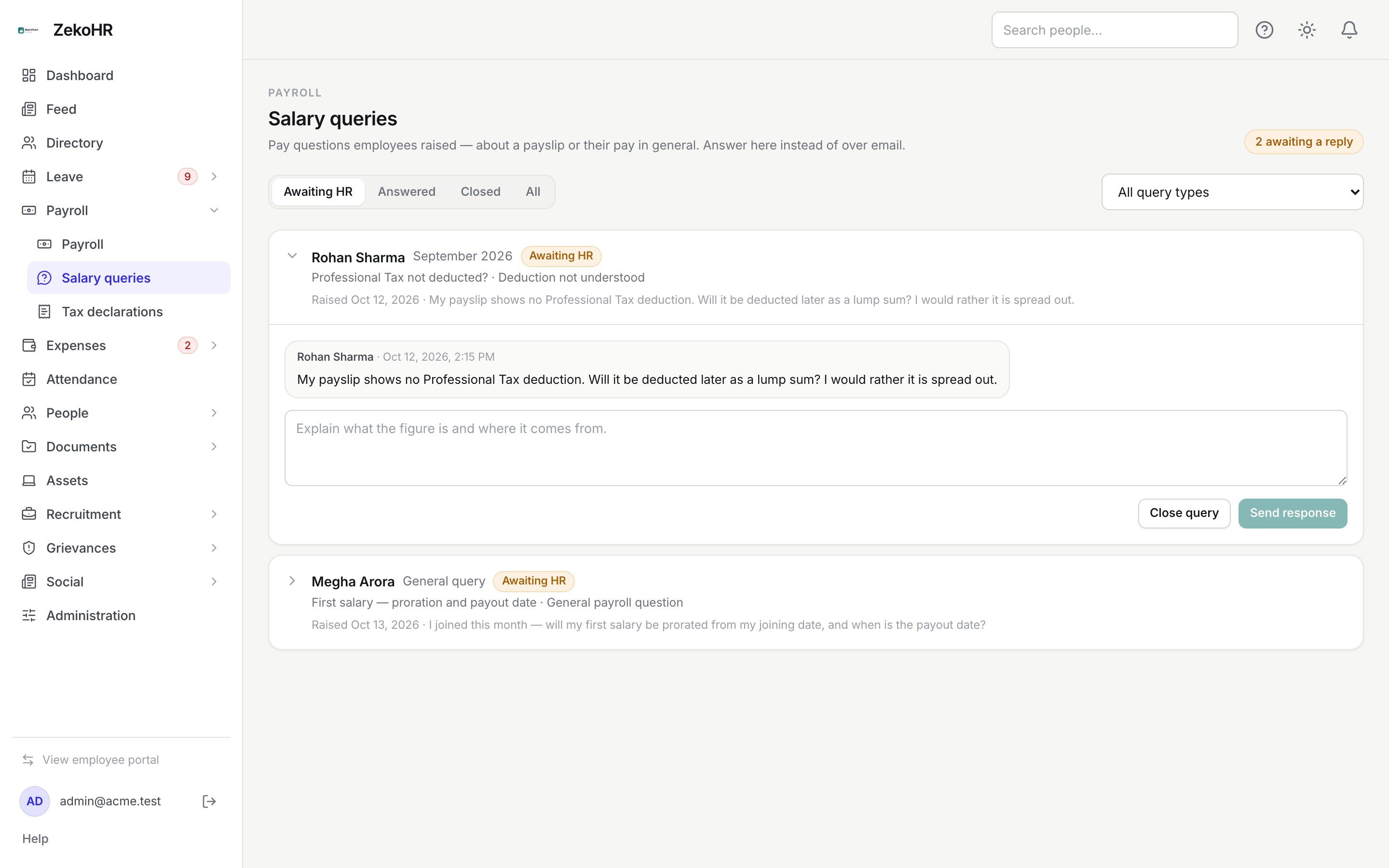
- Read the thread. Messages from employees sit on one side, HR messages in blue on the other. An attachment, if any, is listed with a download link below the messages.
- Open the payslip for context from Payroll → Payroll (the period is on the card) or from the employee's Payslips tab.
- Type your Response (1 to 5000 characters) explaining what the figure is and where it comes from, then click Send response.
- If the query is settled, click Close query. You can close without responding.
A reply from the employee moves the query back to Awaiting HR and resurfaces it at the top.
Statuses
| Status | Shown as | Meaning | What happens next |
|---|---|---|---|
| open | Awaiting HR | New, or the employee replied last | Respond or close |
| answered | Answered | HR sent the latest message | Wait for the employee, or close |
| closed | Closed | Ended by either side | Read-only; nobody can post |
What happens next
- Your response triggers an in-app notification and an email to the employee with your text and a link to the thread. Closing sends nothing.
- New queries notify every user who holds `payroll_queries.manage` and can see the payslip's company, by in-app notification and email.
- Submitting, answering, replying and closing are each written to the audit log.
- Answering does not change the payslip. If the employee is right, correct the run: roll back, edit, finalize and publish, then tell them in the thread.
Rules and limits
- A query is addressed to the company of the payslip (or the employee's company for a general query). HR in another company cannot see it; the request returns "not found" rather than "forbidden" so pay disputes do not leak.
- One attachment per query, uploaded at submission. Follow-up evidence arrives as text.
- Closed queries cannot be reopened; the employee raises a new one.
- Your reporting line plays no part: managers never see queries, even for their reports.
- From the employee's Payslips tab you can reply but not close; use the queue to close.
Troubleshooting
The queue is empty but an employee says they raised a query. Check the status filter (All) and your HR scope; the payslip's company may not be assigned to you.
I cannot post a response. The query is closed, or the response box is empty.
The employee did not receive my answer. Check Settings → Email log for the answer email; the in-app notification is delivered regardless.
A query refers to a payslip I rolled back. The period label is a snapshot, so the card still reads correctly. Republish the run and the employee can open the corrected slip.