Your documents
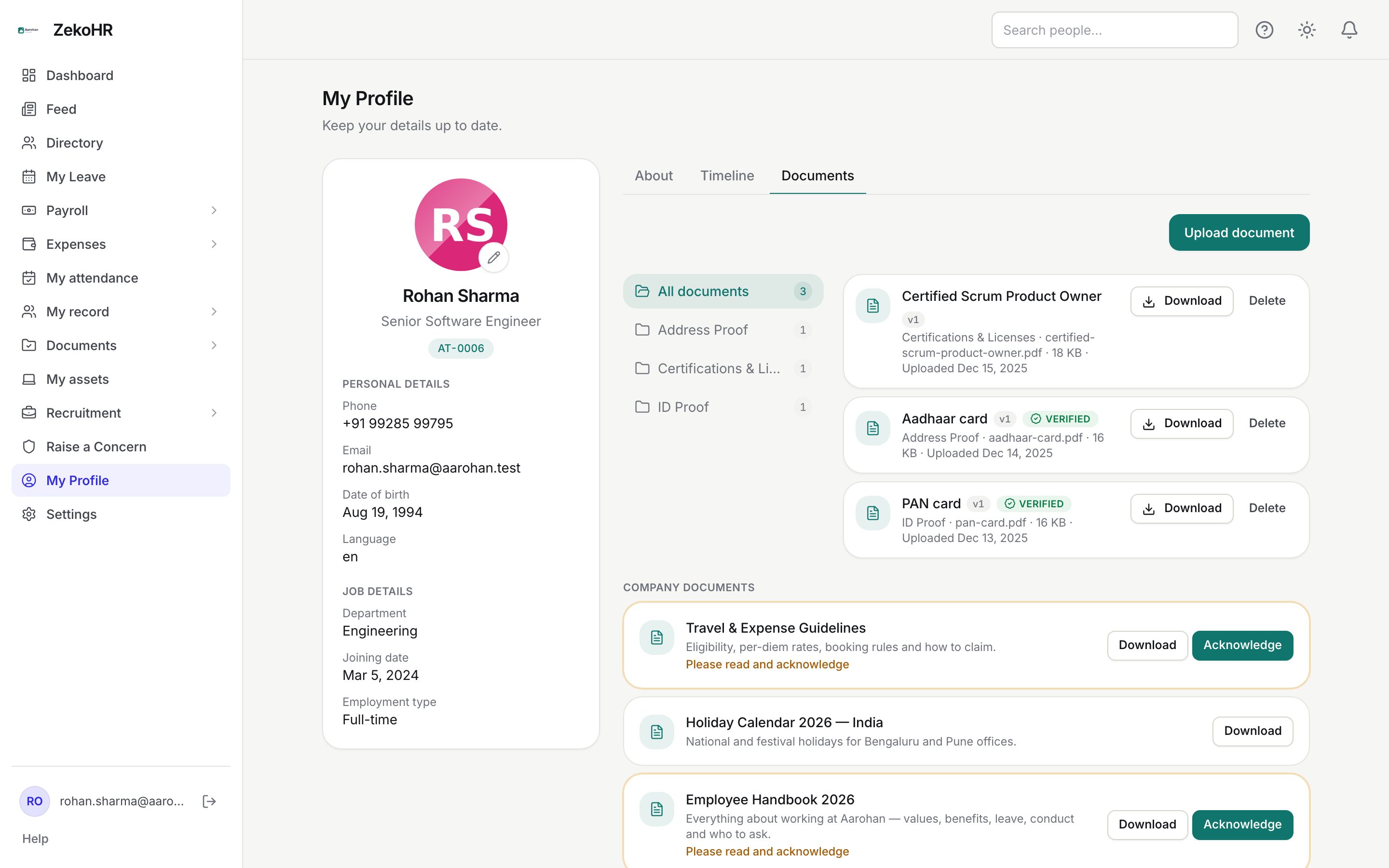
The Documents tab on your profile holds the files you have given the company (ID proof, address proof, certificates), anything HR has asked you to upload, and the company-wide documents HR has published for you to read. Uploads are versioned, some categories go through HR verification, and expiry dates are tracked so you are warned before a document lapses.
Who can do this: Every employee for their own documents. No separate permission key is needed; the tab is part of your profile. Contractors see it only when the Admin has switched Documents on for contractors under Settings → Contractor access.
Where to find it
My Profile, then the Documents tab (`/profile?tab=documents`). The dashboard card Documents to acknowledge under Needs your attention also links here.
Uploading a document
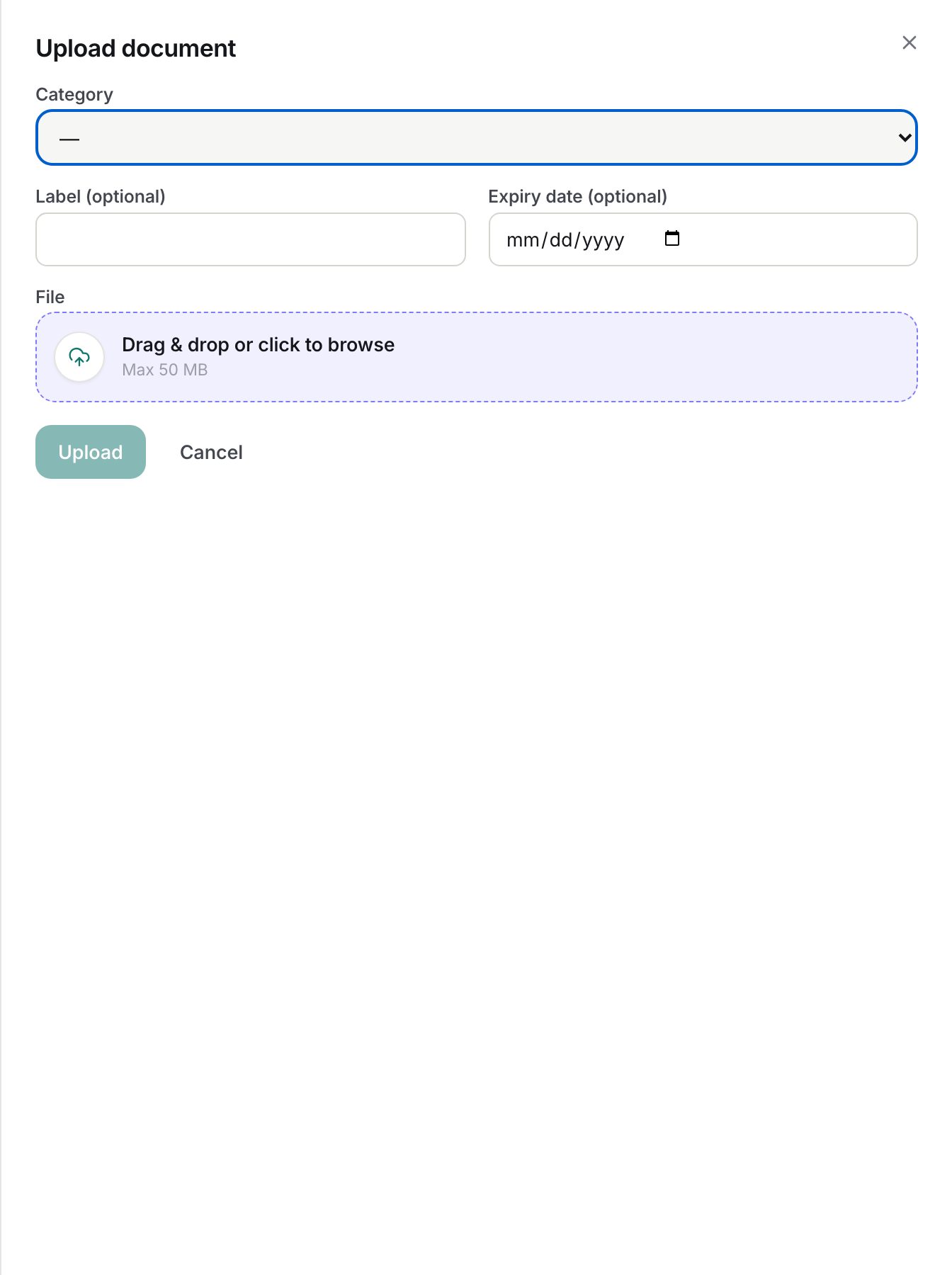
- Click Upload document.
- Choose a Category. Categories are set up by HR (for example ID Proof, Address Proof, Employment Documents). The category decides whether HR must verify the file.
- Label (optional): a name shown instead of the file name, up to 255 characters. Uploading again with the same category and label creates a new version rather than a second document.
- Expiry date (optional): must be a date after today. Use it for passports, visas, licences and certifications so the expiry reminders work.
- File: drag the file onto the drop area or click it to browse. Allowed types are PDF, JPG, JPEG, PNG, WEBP, DOC and DOCX. The size cap is shown in the drop area (50 MB by default); an oversized file is refused before upload.
- Click Upload.
The new card shows the version (v1, v2...), category, file size and upload date. Use the All documents folder or a category folder on the left to filter. Download opens the file; Delete removes that version. Only the current version of each document is listed.
Needs your attention
This section appears above your documents only when there is something to do:
- {Category} requested: HR has asked you for a document, with an optional note and due date; the pill turns red once the due date has passed. Drop the file onto the card and the request is marked as uploaded automatically.
- Rejected: HR declined an upload and the reason is shown. Drop a replacement on the card; it becomes a new version and goes back for verification.
Company documents
Documents HR has published for your company appear under Company documents. Use Download to read one; if it says Please read and acknowledge, click Acknowledge after reading. Acknowledgement is recorded per version: when HR publishes a new version you see Updated since you acknowledged it, with the version and date you previously confirmed, and an Acknowledge v2 style button. Your earlier acknowledgement is kept as a record.
Statuses
| Status | Meaning | What happens next |
|---|---|---|
| Pending verification | The category requires HR review and nobody has reviewed this version yet | HR verifies or rejects it from the Documents Center |
| Verified | HR has checked the document; the badge shows who verified it on hover | Nothing; upload a new version if it changes |
| Rejected | HR declined it with a reason | Re-upload from the attention card |
| No badge | The category does not require verification; the file was accepted immediately | Nothing |
| Expires soon | An expiry date is within the warning window | You get a reminder 30 and 7 days before expiry |
What happens next
- An upload into a category that requires verification lands in HR's Pending verification queue; other categories are accepted at once.
- Uploading into a requested category fulfils your oldest pending request for that category.
- A rejection sends you an in-app notification and email (document.rejected template) with the reason.
- Expiry reminders reach you exactly 30 and 7 days before the expiry date; request reminders go out 3 days before the due date and once when overdue.
- Uploads also raise your profile completeness score.
Rules and limits
- Only you can upload, download and delete your documents; HR views them from your employee record and may verify, unverify or reject, but never uploads on your behalf.
- Deleting removes that version only; earlier versions are not restored.
- The expiry date on a new upload must be in the future.
- Acknowledging twice on the same version records one acknowledgement.
- Company documents are visible only if published to all companies or to your company; with no company assigned you see org-wide documents only.
- The Documents module must be enabled on your plan; Admins can check Settings → Billing.
Troubleshooting
My upload says the file is too large. Compress or split the file so it fits under the cap shown in the drop area.
I uploaded the right file but the request card is still there. The request is fulfilled only by an upload into the same category it asked for. Check the category you picked; upload again into the requested one if needed.
My document has no Pending badge. That category does not require verification, so the upload was accepted immediately. Only categories HR switched on in Documents → Settings go through the queue.
I acknowledged a document but it asks again. HR published a new version. Read and acknowledge it again; your old acknowledgement remains on record.
I cannot see the Documents tab. The Documents module is off for your plan or, for contractors, not enabled under Contractor access.