Leave records and apply on behalf
Leave Records is the HR-wide list of every leave request across the companies you cover, with filters and direct actions. The Leaves tab on an employee's record shows the same requests for one person, adds Apply leave on behalf for emergencies, and holds the Leave visibility control.
Who can do this: `leave_requests.view.any` (HR Manager, Admin) or `leave_requests.view.own_company` to list; approve and reject follow the same rules as the Approvals queue; Apply leave on behalf and HR override need `leave_requests.approve.any`; cancelling started leave needs `leave_requests.cancel.any`; leave visibility needs `leave_visibility.manage`.
Where to find it
Leave → Leave Records. URL: `/leave-records`. Per employee: People → Employees → (employee) → Leaves. URL: `/employees/{id}?tab=leaves`.
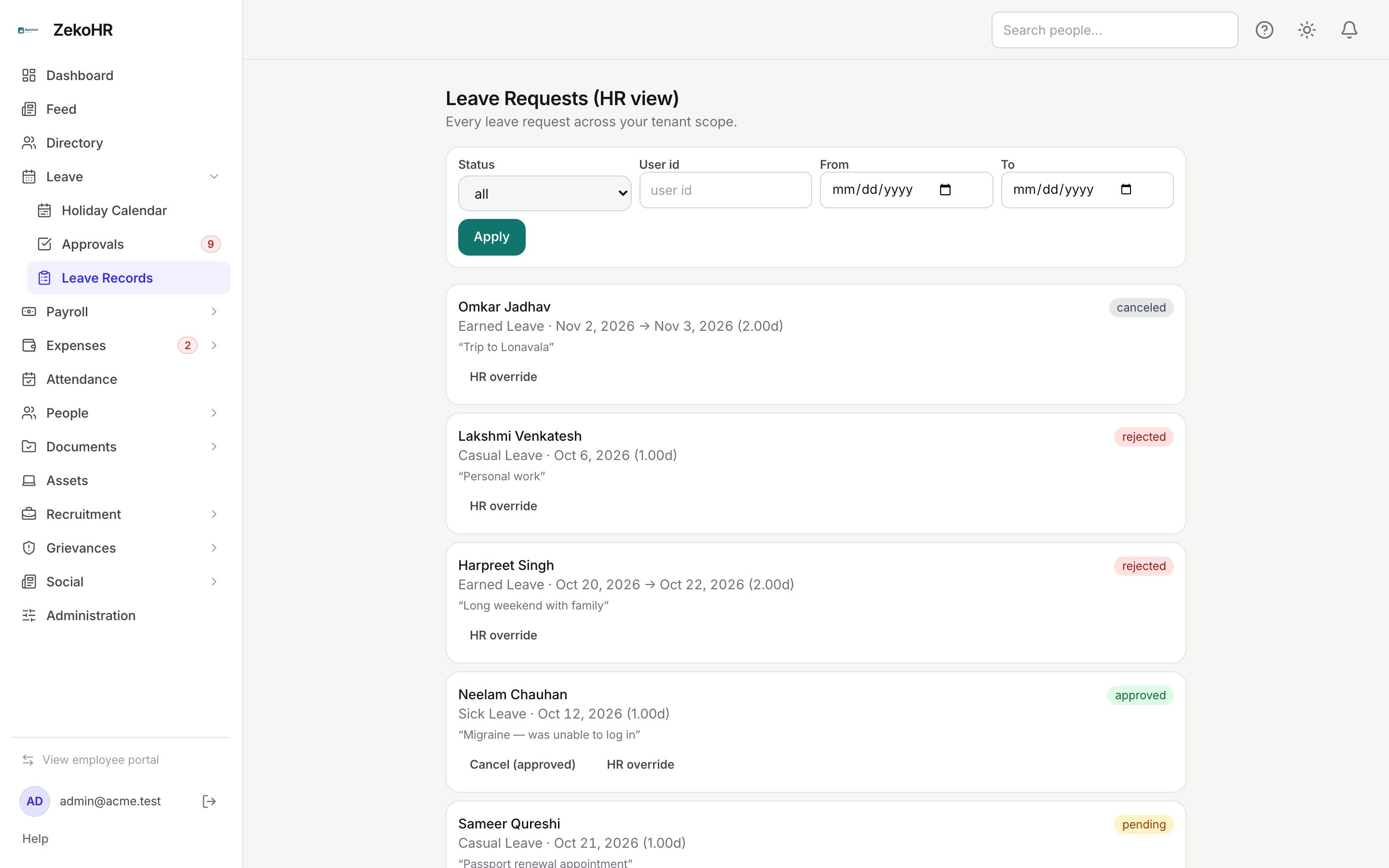
Finding requests
- Set Status (all, pending, approved, rejected, canceled), User id (the numeric employee id), From and To, then click Apply. The date filter returns requests overlapping the range.
- Rows show the employee (linking to their leave page), leave type, dates, day equivalent, the quoted reason and a status badge. Fifty rows load at a time; Load more fetches the next page.
Acting on a request
| Row status | Buttons | Effect |
|---|---|---|
| pending | Approve, Reject (prompts "Reason for rejection?") | Normal decision, as from Approvals. |
| approved | Cancel (approved) | Cancels and refunds the full day equivalent, even if the leave has started. |
| any | HR override | Reveals Reason (recorded in audit log), Override approve and Override reject. See HR override and year end. |
Applying on behalf of an employee
- Open the employee's record and the Leaves tab, then click Apply leave on behalf.
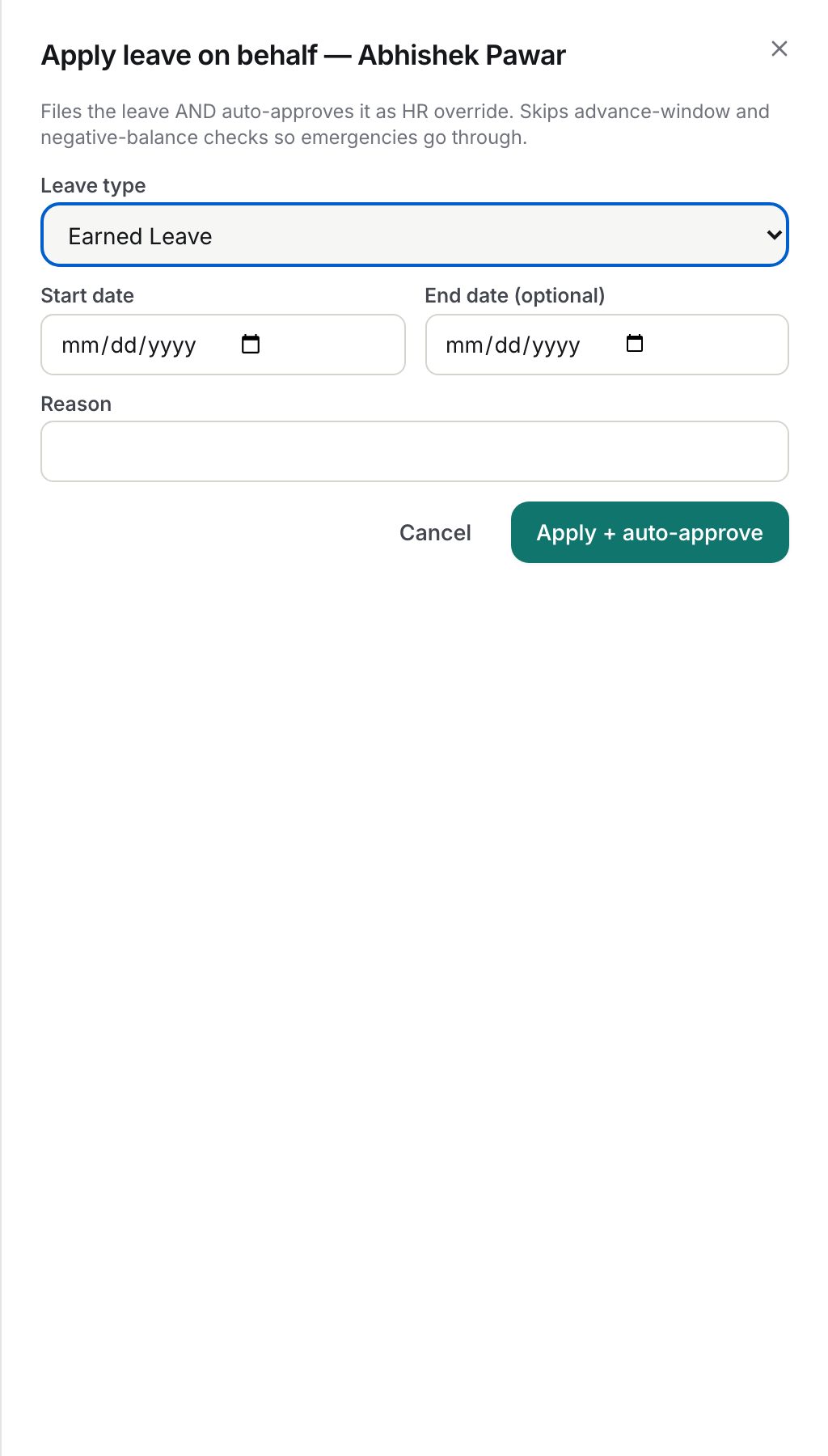
- Choose the Leave type (all active types of their company), Start date, End date (optional) and a Reason (required, up to 500 characters here).
- Click Apply + auto-approve. The request is filed as the employee and approved immediately as an HR override, with the comment "Filed and approved on behalf by HR: {reason}".
The dialog only files full-day requests. It skips the advance and backdated windows and the negative-balance guard, so emergency or back-dated leave goes through. It still enforces reason, overlap with the employee's other requests, working days, and the type's attachment threshold; because no attachment can be supplied, a type that requires one for long requests will refuse.
The Leaves tab
- Pending lists requests with Approve and Reject (a dialog asks for a reason, up to 500 characters, then Confirm reject).
- History lists decided requests with the decision reason; approved future leave has Cancel.
- Leave visibility (shown only in the admin portal and never on your own record) sets who may see this person is on leave: Everyone, Reporting manager & team, or Specific people with a search box to add viewers. HR, admins and the reporting manager always see it; the leave type is never shown to colleagues. Click Save visibility.
What happens next
- Approvals and overrides debit the ledger and notify the employee; rejections and cancellations notify them with the reason.
- Apply on behalf is recorded as filed by HR and approved by HR override, with audit entries, so the trail shows HR filed it.
- Visibility changes are audited and take effect immediately on the calendar and dashboard widget.
Rules and limits
- Scope: with `leave_requests.view.any` you see every company unless your HR scope narrows it; with `.own_company` you see your own company only.
- Approve and Reject on Leave Records obey the same authority rules as the Approvals queue; an error means you are neither the assigned approver nor the holder of an approve permission covering that company.
- Apply on behalf requires `leave_requests.approve.any`; HR Managers have it by default.
- Half-day, hourly and attachments are not available in the on-behalf dialog.
- Visibility viewer lists hold up to 200 people from the same organisation.
Troubleshooting
The User id filter finds nobody. It expects the numeric id shown in the employee URL, not a name.
Apply on behalf fails with an attachment error. The leave type requires an attachment at that length. Ask the employee to apply themselves, or temporarily raise the threshold.
I cannot see the Leave visibility card. You lack `leave_visibility.manage`, you are in the employee portal, or you are on your own record.
Cancel (approved) refunded too much. Refunds are always the full amount; post a manual adjustment for days already taken.