HR override and year end
Two HR-only mechanisms sit on top of the normal leave flow. HR override lets HR approve a rejected request or reject an approved one, with a mandatory reason that lands in the audit log. Year-end rollover runs automatically each night and closes each allocation when its leave year ends and applies the type's lapse policy, or the per-employee override HR set on the allocation.
Who can do this: HR override needs `leave_requests.approve.any` (HR Manager, Admin). Setting a per-employee year-end action needs `leave_allocations.adjust.any` or `.adjust.assigned_companies` within HR scope. The rollover runs by itself.
Where to find it
Override: Leave → Leave Records, button HR override on any row. URL: `/leave-records`. Year-end action per employee: People → Employees → (employee) → Leave Allocation → Edit on a balance card. Policies per type: Administration → Settings → Leave → Leave types.
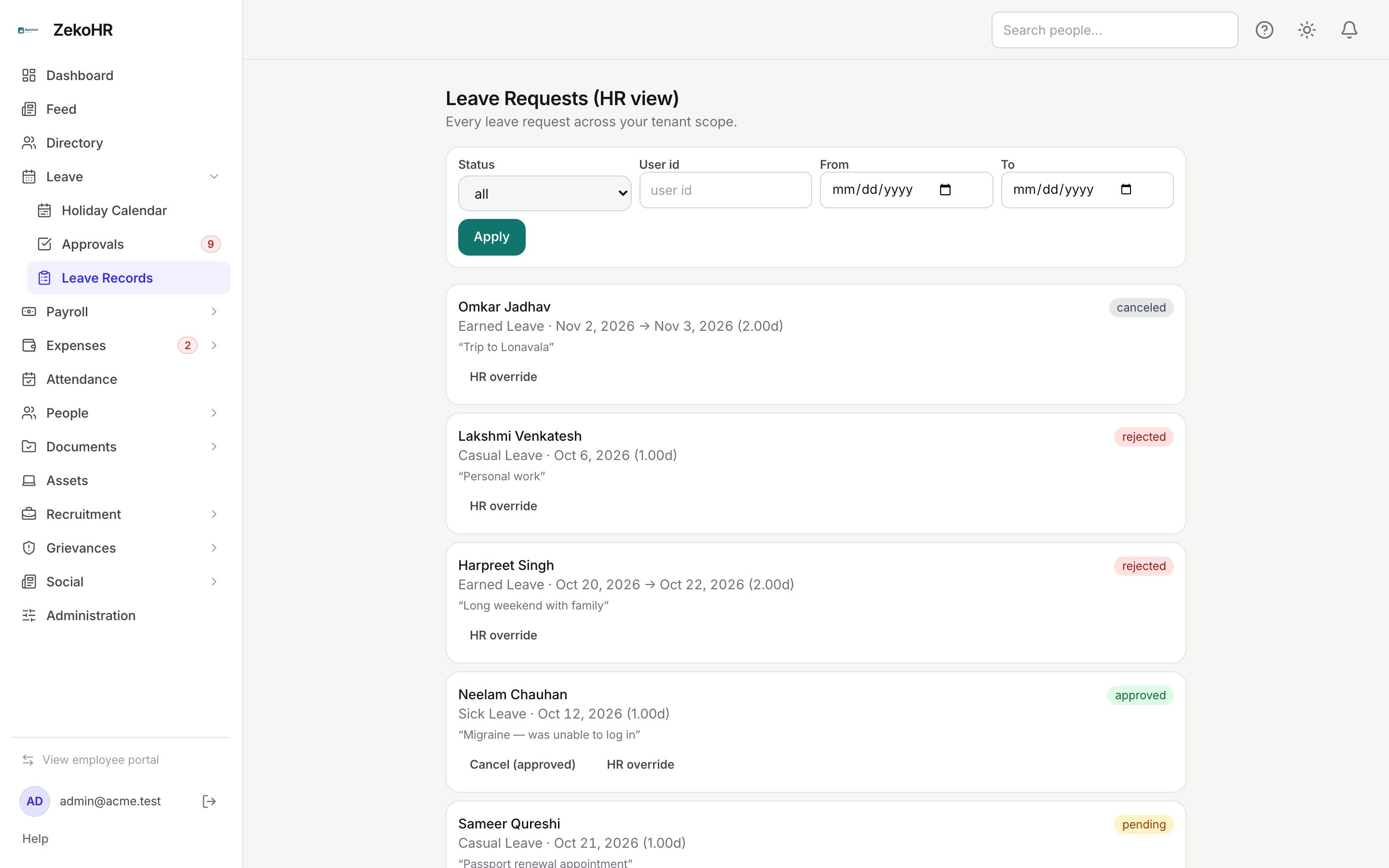
Overriding a decision
- Find the request in Leave Records and click HR override.
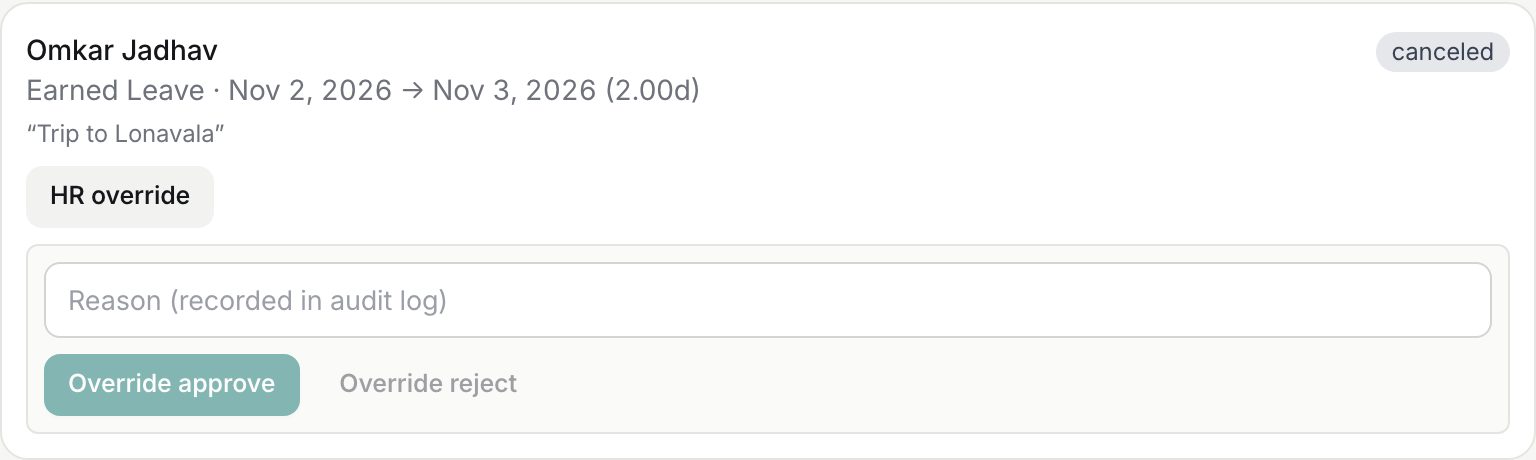
- Type the Reason (recorded in audit log), up to 500 characters. Both buttons stay disabled until it is filled.
- Click Override approve or Override reject.
| Action | Allowed from | Effect |
|---|---|---|
| Override approve | pending or rejected | Debits the balance (or consumes comp-off credits), status becomes approved. |
| Override reject | pending or approved | If approved, the debit is refunded first; status becomes rejected. |
Other combinations return "Request must be pending or rejected for HR override." or "… pending or approved …". Without the permission you see "You do not have permission to HR-override this request."
What happens after an override
- The request records the override action with your reason, and the audit log stores the employee, type and reason.
- The employee receives the leave approved or rejected notification naming you as decider with your reason.
- Refunds appear on the employee's ledger as "Leave refunded" with the note "HR override reject".
Year-end rollover
Every night ZekoHR finds allocations whose leave year ended the day before. For each with a positive balance it applies the effective year-end action: the allocation's own override if HR set one, otherwise the leave type's lapse policy.
| Effective action | Source policy | Result |
|---|---|---|
| Lapse | expire | The whole balance is written off as a "Lapsed" row. |
| Carry forward | carry | Carried into the new year as "Carried in", up to the type's cap. The excess lapses. With carry-forward disabled or no cap on the type, the whole balance carries. |
| Encash | encash | The whole balance leaves the ledger as an "Encashed" row and an audit entry records the days. |
| Carry or encash | carry or encash | Carry up to the cap; the excess is encashed instead of lapsed. |
The cap is absolute days, or percent of the allocation's amount. Zero or negative balances are skipped.
Employees see the outcome on My Leave as Lapsed or Encashed figures, and the next year's card shows the carried amount within Credited this year. The current action is shown on every balance card as "At year end: …".
Setting a per-employee year-end action
- On the Leave Allocation tab click Edit on the balance card.
- Change At year end from Leave type default (…) to Carry forward, Encash, Carry or encash, or Lapse, add a Reason / note, and Save. The same field exists on Manual balance adjustment.
- The override applies to that allocation only; the next year's allocation follows the type again unless you set it again.
Rules and limits
- Encashment does not flow into payroll. The ledger row records the days; pay it as a manual earning in the next payroll run (see Payroll extras and reimbursements). ZekoHR does not compute PF, ESI, PT or TDS on it automatically.
- The carry Expiry (months) field on the leave type is saved but not applied at year end.
- The new year's allocation row is created by the rollover only when something carries. Employees with nothing carried get their new balance when HR runs Bulk leave allocation.
- Accruals continue in the new year, nightly, for allocations that exist: annual types credit on the year start, quarterly and monthly on their boundaries.
- Overrides on comp-off requests restore or consume credits rather than ledger days.
- Managers cannot override; the button is HR-only.
Troubleshooting
Carry forward did not happen. The balance was zero or the type's cap was 0; check the leave type and the employee's History for a Lapsed row.
An employee was encashed but there is no money in payroll. Expected; add a manual earning line in the payroll run using the days from the ledger.
Balances vanished on 1 April. Types set to expire lapsed as designed; new balances need Bulk leave allocation.
Override reject on started leave left the balance too high. The refund is the full amount; post a negative manual adjustment for days taken.