The grievance queue
The grievance queue is where HR Managers and Admins handle reports raised by employees or through the public link. It is confidential: regular managers have no access, even for cases involving their own team. Each case moves through a short lifecycle, open, in review, then resolved or dismissed, and every step is journaled.
Who can do this: Viewing needs `grievances.view.assigned_companies` (HR Manager, limited to companies in their HR scope) or `grievances.view.any` (Admin). Changing status needs the matching `grievances.manage.assigned_companies` or `grievances.manage.any`. This module must be enabled on your plan; Admins can check Settings → Billing.
Where to find it
Grievances → Grievances in the sidebar, URL `/grievances`. Click a row to open `/grievances/{id}`.
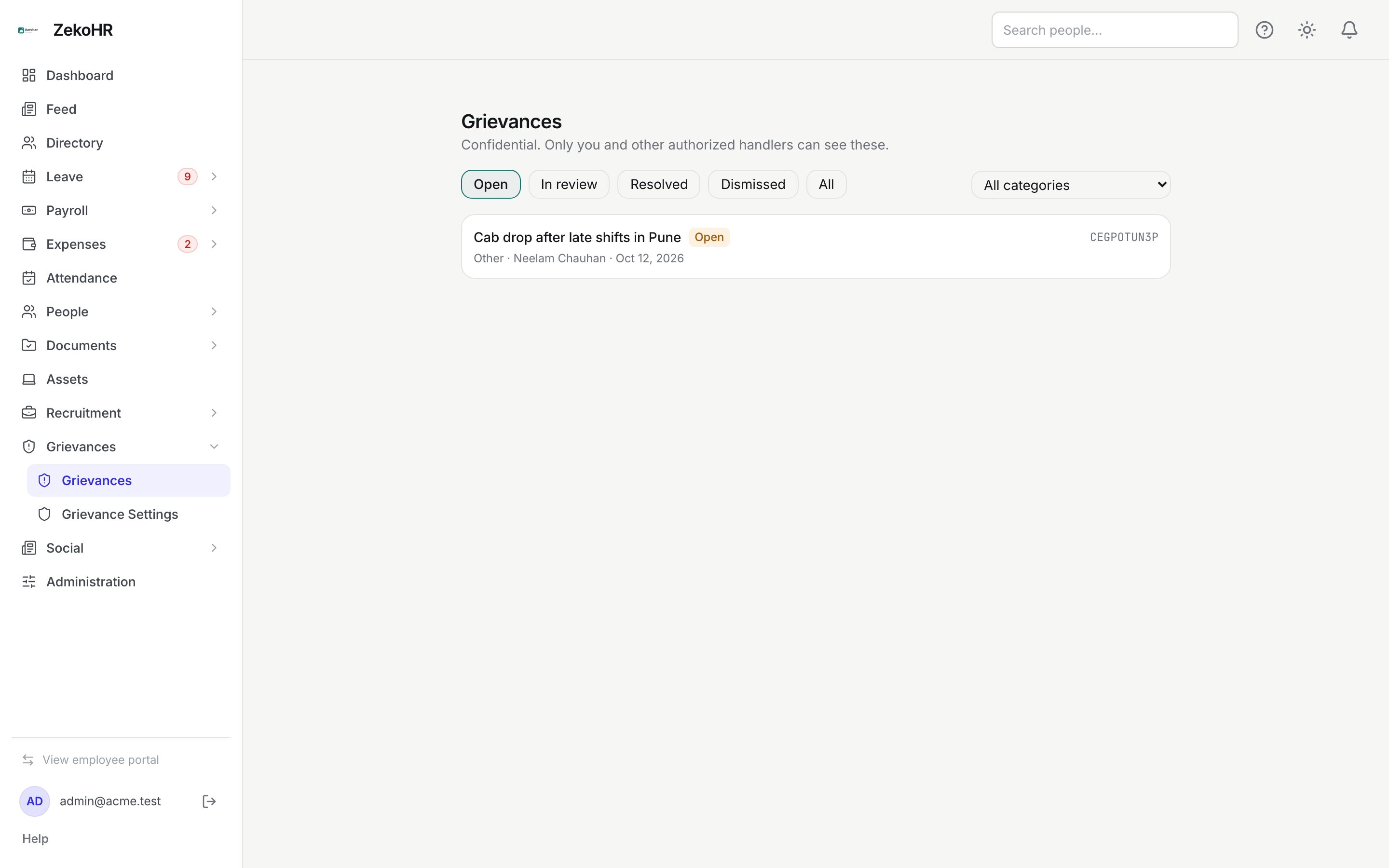
The queue
- Status pills: Open (default), In review, Resolved, Dismissed, All.
- All categories dropdown filters by category.
- Each card shows the subject, a status badge, a red Retaliation feared tag when the reporter ticked that box, the tracking code, the category, the reporter's name (or Report anonymously) and the filing date. Cards are ordered newest first.
- The empty state reads No grievances in this view.
The case page
The detail page shows the subject and status, then the category, tracking code and date. If the reporter feared retaliation, a red banner reads The reporter has indicated fear of retaliation. Handle with extra confidentiality and ensure no adverse action follows.
| Section | Content |
|---|---|
| Reporter | Name for named reports; Report anonymously otherwise. The reporter's email is in the record for named reports |
| Person(s) involved, Date of incident, Location | Shown only when the reporter filled them |
| What happened? | The full description |
| Evidence | One download link per file; files stream through an authenticated download |
| Resolution | The closing note, once resolved or dismissed |
| History | Timestamped journal: submit, then each status change with its note |
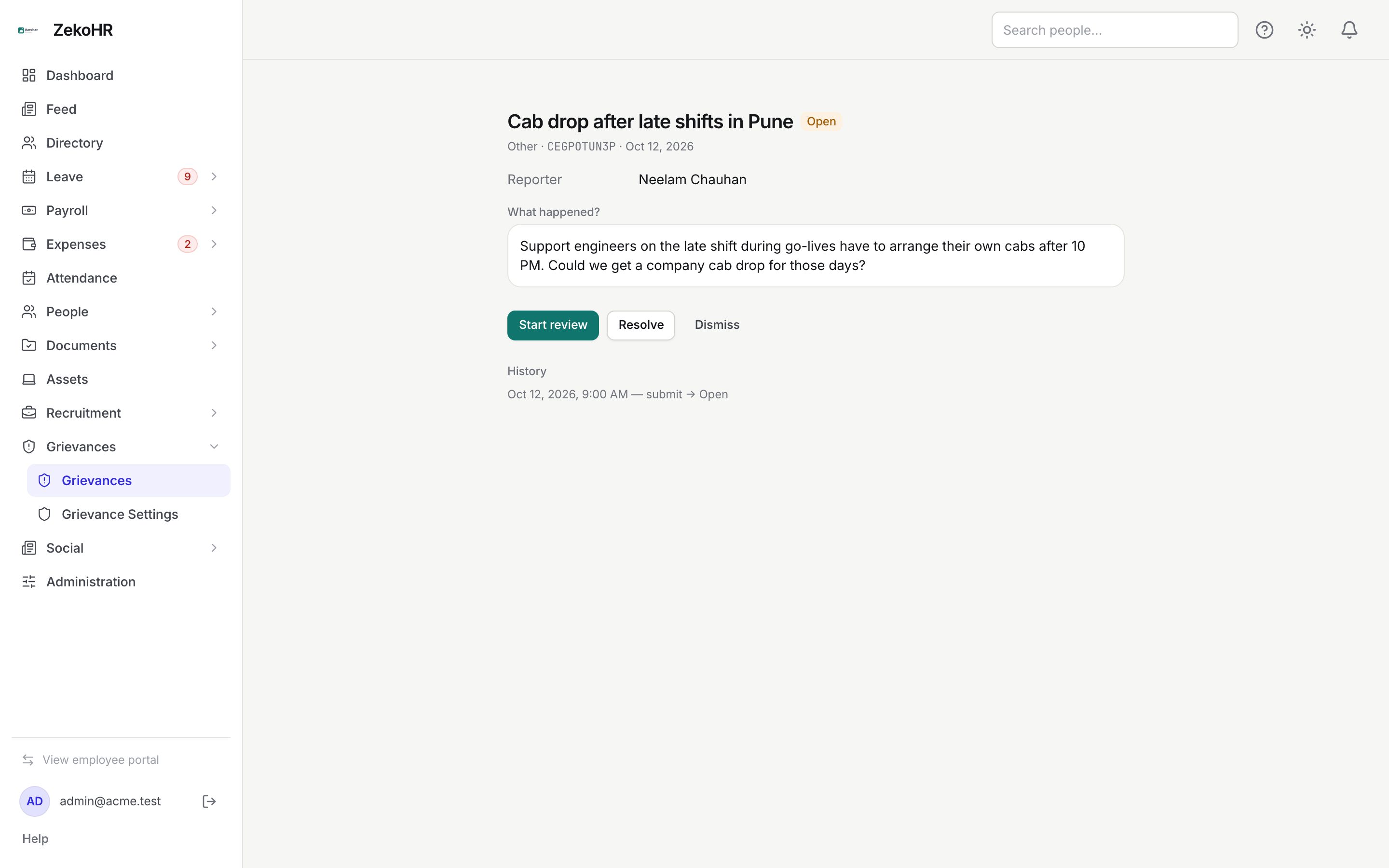
Handling a case
- Open the case from the queue and read it in full. Download evidence with the Download links; downloads are served only to handlers in scope and to the named reporter.
- Click Start review. The status becomes In review. This is the only way out of Open.
- Investigate outside ZekoHR as your policy requires (PoSH committee, internal audit, and so on). There is no messaging with the reporter inside the product.
- Close the case with Resolve or Dismiss. A prompt reads Enter a resolution note (shared with the reporter):. The note is required, up to 5,000 characters; cancelling the prompt leaves the status unchanged.
- The case shows the Resolution block and the buttons disappear. A closed case cannot be reopened.
Statuses
| Status | Meaning | What happens next |
|---|---|---|
| Open | Filed, nobody has started | Start review, or close directly with Resolve/Dismiss |
| In review | Being investigated | Resolve or Dismiss with a note |
| Resolved | Closed with an outcome | Note visible to the reporter; final |
| Dismissed | Closed without action | Note visible to the reporter; final |
What happens next
- Every status change writes a history entry, an audit log entry `grievance.status_changed` with the from and to status, and, for named reports, an email plus in-app notification to the reporter with the new status.
- Anonymous and public reporters are not notified; they see the status and your note on the tracking-code page.
- Resolving stores who closed the case and when.
- New reports notify every user holding a grievance view permission (email and in-app) with the category and tracking code only.
Rules and limits
- HR Managers see and act only on cases attached to companies in their HR scope. Cases with no company (public reports where the reporter chose Not sure / prefer not to say) are visible to Admins only.
- The reporter of a named case can open their own case page but sees no history and has no action buttons.
- Status can only move forward: open → in review → resolved or dismissed. There is no reopen.
Troubleshooting
The queue is empty but an Admin sees cases. The cases belong to companies outside your HR scope, or have no company. Ask an Admin to extend your scope or handle them.
Resolve did nothing. You cancelled the note prompt or left it blank. A note is mandatory.
I cannot download evidence. Your scope does not cover the case's company, or the file belongs to a different case.
The reporter says they were not told the outcome. They filed anonymously or through the public link. Only named reporters receive notifications; others must check the tracking code.
I need to reopen a resolved case. Not possible; ask the reporter to file a follow-up quoting the original tracking code.