Plans and trial
Every self-service organisation starts on a free trial of the full product and chooses a paid plan from the Billing page when ready. Plans are priced per user per month, billed monthly or annually, with GST added on the invoice.
Who can do this: The Billing page needs `settings.manage` (Admin). Buttons that change money (Choose a plan, Change plan, Pay now, add-ons, payment method) are shown only to the recorded account owner, normally the person who signed up; other Admins see the page read-only.
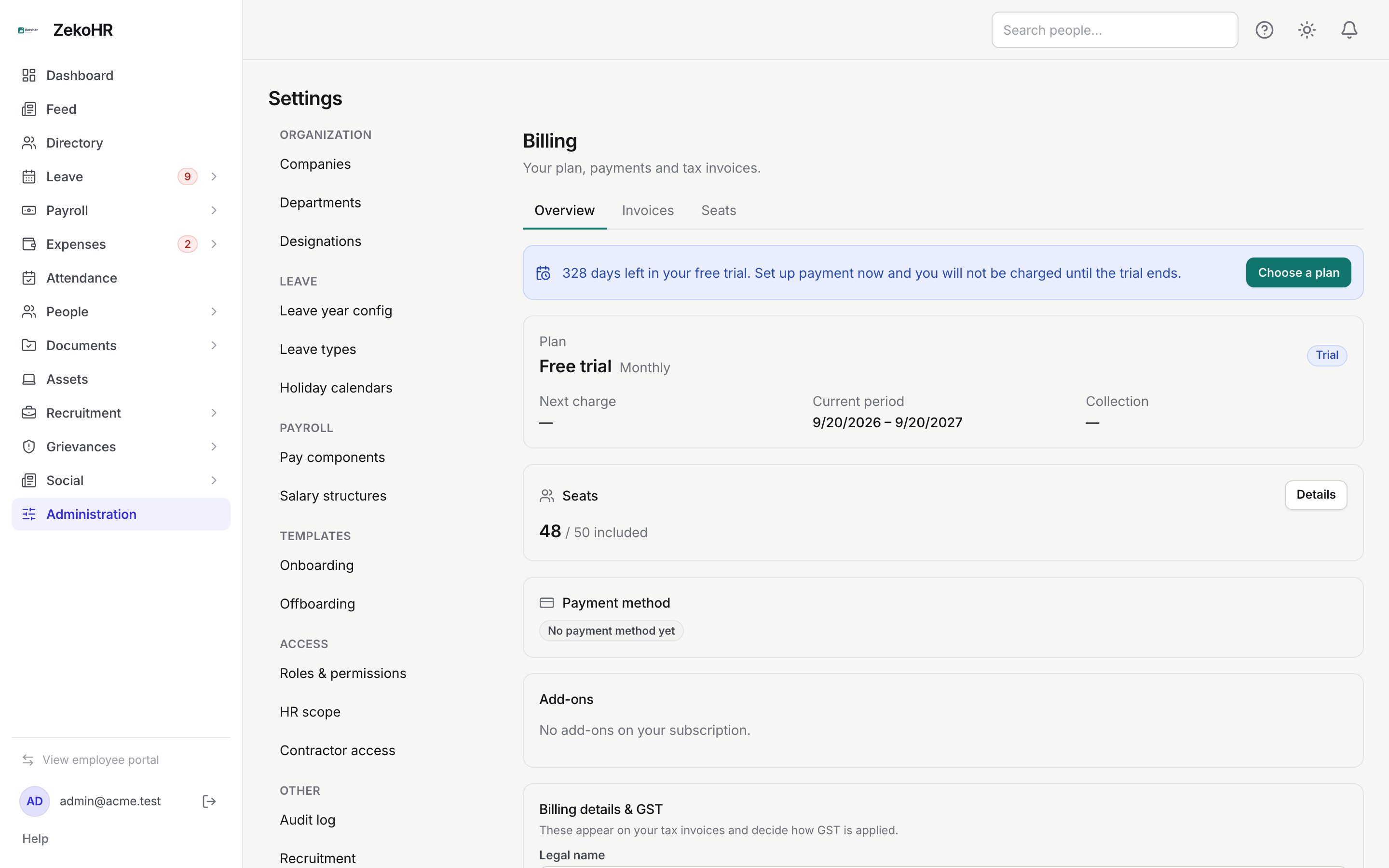
Where to find it
Administration → Settings → Other → Billing, URL `/settings/billing`, Overview tab.
The plans
| Starter | Growth | Pro | |
|---|---|---|---|
| Core modules (employees and directory, leave, attendance, documents, knowledge base, recruitment, contractors) | Yes | Yes | Yes |
| Onboarding and offboarding, Documents Center, assets, letters, policies, change requests, audit log, expenses | Yes | Yes | |
| Payroll and payslips, tax declarations, salary queries, social feed, grievances, webhooks and API access, Google Workspace SSO | Yes | ||
| Seats included | up to 50 | up to 250 | up to 2,000 |
| Companies | 1 | 3 | 25 |
| Document storage | 10 GB | 50 GB | 250 GB |
| Audit log retention | 6 months | 24 months | 84 months |
| Support | Priority |
Prices are shown on the public pricing page and, for your exact seat count, inside the Choose your plan dialog. The annual price is ten times the monthly price (two months free).
The free trial
- Length: one year from signup, on a hidden Free trial plan that includes every module.
- Seat cap: 50 non-offboarded people. Adding a 51st is refused with "Your plan includes 50 seats and you are using 50. Upgrade to add more."
- The Billing banner counts down ("328 days left in your free trial") and reads "Set up payment now and you will not be charged until the trial ends."
Converting to a paid plan
- On the Overview tab click Choose a plan.
- In Choose your plan, pick Monthly or Annual, then a plan. Plans that cannot hold your current seat count are greyed out with the reason ("You have 60 billable seats, but the Starter plan supports at most 50").
- Optionally enter a Coupon code and click Apply; the quote re-prices.
- Read the quote: plan and seat count, any coupon discount, GST (18%) and the Total per month or Total per year. The Continue to payment button only appears once the quote is on screen.
- Click Continue to payment. The Razorpay window opens; complete the payment or mandate there. Monthly plans set up an auto-debit mandate; annual plans are a single prepaid order.
- Keep the dialog open while it shows Confirming your payment…; the confirmation reaches ZekoHR a little after your bank authorises, and the status flips to Active when it lands. After about two minutes without it you get Check again and Talk to us ([email protected]); nothing is charged twice.

Before checkout can start, Billing details & GST must be complete; the dialog says "Fill in Billing details & GST on the billing page, then come back here." See Seats and invoices.
What happens next
- Platform emails mark the trial: a welcome, setup nudges naming your next step, check-ins at 30, 90 and 180 days (skipped when the organisation is clearly active), and reminders 90, 30, 7 and 1 day before the end.
- A confirmed payment switches the status to Active, applies the chosen plan, and issues the first tax invoice to the billing contact.
Statuses
| Status badge | Meaning | What happens next |
|---|---|---|
| Trial | On the free trial | Convert any time; not charged until the trial ends |
| Active | Paid and in good standing | Normal use; Change plan available |
| Payment due | A renewal failed | Fully usable for 7 days while retries run; Pay now shown |
| Grace period | Retries exhausted or trial ended unpaid | Read-only for 14 days; paying restores immediately |
| Suspended | Grace ended | Sign-in limited to billing; paying restores |
| Paused | Agreed pause | No charges, no access, resumes automatically |
| Cancelled | You cancelled | Read-only through the 90-day retention window |
| Expired | Trial over, no plan | Choose a plan to continue with data intact |
Rules and limits
- The plan sets the modules; hidden module pages disappear from the sidebar rather than showing a lock.
- Seats are counted as non-offboarded people across all companies; see Seats and invoices.
Troubleshooting
Choose a plan is missing. You are not the account owner, or the organisation is billing-exempt.
All plans are greyed out. Your seat count exceeds every plan's ceiling, or the billing profile is incomplete; the dialog states which.
The trial ended and the portal is read-only. Click Choose a plan on the red banner; access returns as soon as the payment confirms.