General settings
General is the one Settings page that is about you rather than the organisation. It holds three tabs: which notifications you receive on which channel, a password change form, and your display language. Every user has it; it is documented here because Admins often expect it to be organisation-wide and it is not.
Who can do this: Everyone. The notification tab uses `notifications.preferences.manage.self`, the language tab uses `profile.update.self`; both are in every default bundle including Contractor.
Where to find it
Administration → Settings → Other → General, URL `/settings/general`. The page heading reads Settings with the subtitle "Manage your account preferences."
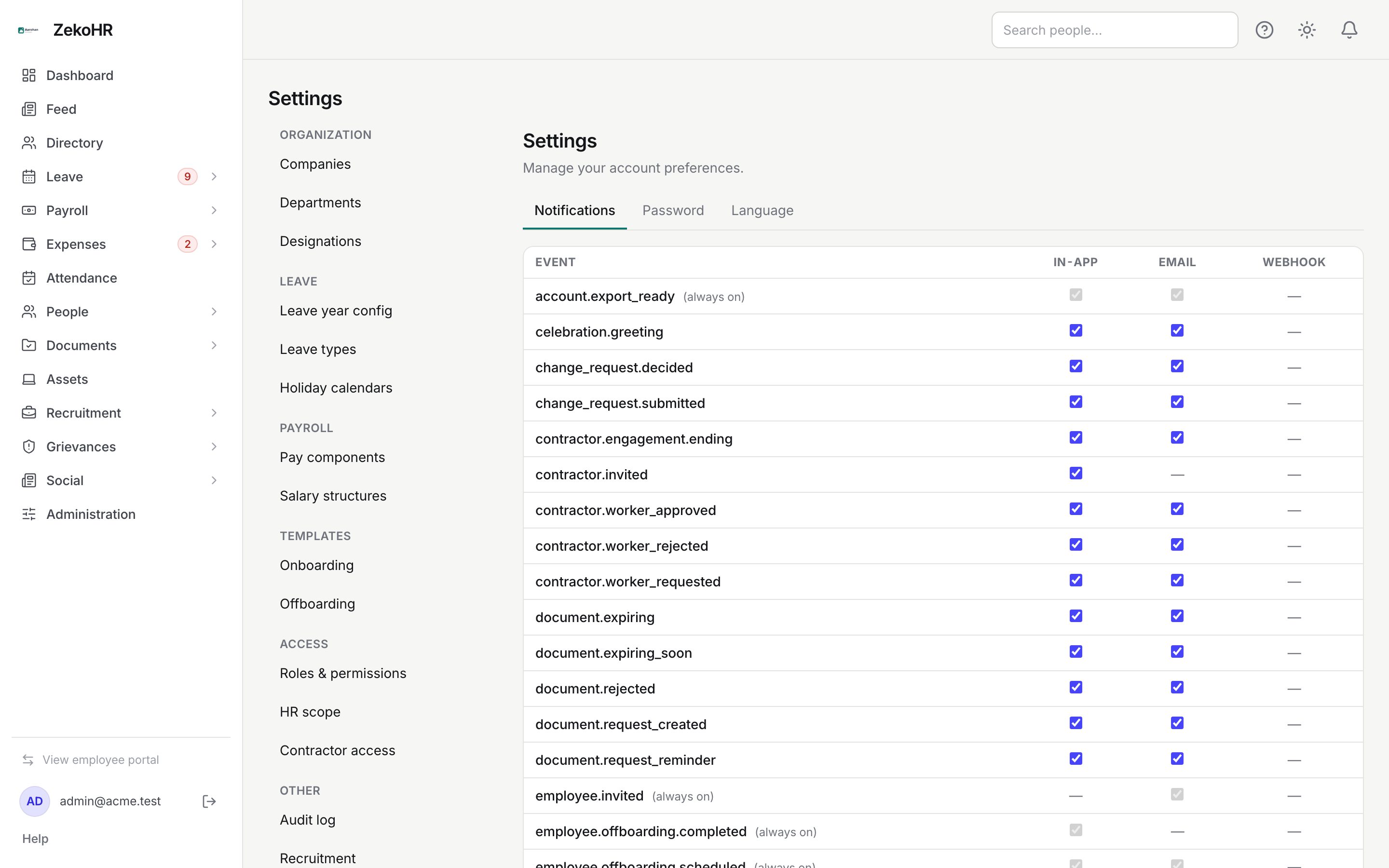
Notifications tab
The table lists every notification event your role can receive, one row per event, with a checkbox per channel: in-app, email and webhook. A dash means the event is never delivered on that channel.
- Tick or untick the channels you want for each event (for example `leave.applied` by email off, in-app on).
- Click Save preferences. The button is enabled only when something changed; a small Saved. confirms.
Rows marked (always on) are security-critical and cannot be switched off: `account.export_ready`, `employee.invited`, `employee.offboarding_completed`, `employee.offboarding_scheduled` and similar. Their checkboxes are greyed out and are not sent with the save.
The webhook column shows a dash for every event unless the Webhooks & API access add-on has been activated for your organisation by the ZekoHR team.
What this tab does not do: it does not change what other people receive, and it does not change the wording of emails. Wording is under Settings → Email templates; see Email templates.
Password tab
Three fields: Current password, New password and Confirm new password. The new password must be at least 8 characters and the two new fields must match ("New password and confirmation do not match." is shown otherwise). Click Update password; a Password changed. line confirms. A wrong current password returns the server's message. The full flow, including forgotten passwords, is in Change password.
Language tab
Display language lists English, العربية, Français and Español, but only English can be saved at the moment; choosing another language and clicking Save language returns a validation error. The interface ships in English only. Theme (light, dark, system) is not here; it is the sun icon in the top bar. See Theme, language and search.
What happens next
Saved preferences apply to the next event raised; nothing already queued is recalled. A password change takes effect at once and the server emails nothing about it. The language cannot be changed yet. None of these write to the audit log.
What the columns mean
| Column | Meaning |
|---|---|
| Event | The internal event name, grouped alphabetically; the dot prefix tells you the module (`leave.`, `expense.`, `document.`, `contractor.`) |
| in-app | Appears in the bell menu and on Notifications |
| Sent to your work email using the matching email template | |
| webhook | Shown as a dash unless the Webhooks & API access add-on is active |
Rules and limits
- Preferences are per user. An Admin cannot set them for someone else.
- Security-critical events ignore preferences entirely.
- Events for modules not on your plan do not appear. This module must be enabled on your plan; Admins can check Settings → Billing.
- The language choice changes the interface only; email templates are English unless you edit them.
- Password rules on this form are the minimum; the organisation's 2FA policy on the Security page may additionally require a second factor.
Troubleshooting
Save preferences is greyed out. Nothing has changed yet, or you only touched always-on rows.
I unticked email but still get the message. Either the event is always-on, or the email is a digest such as `pending_actions.reminder` sent under a different event key. Check Settings → Email log for the template slug.
An event I expect is missing. Your role cannot receive it (for example approval events for someone with no reports), or the module is not on your plan.
Saving a language other than English fails. Only English is available; the other options are placeholders until more translations ship.