My assets
My assets lists the company equipment you are responsible for right now: what it is, its serial number, when it was issued and the condition it was in. Items you have handed back drop off the list; their history stays in HR's register. There is nothing to submit here; returns are recorded by HR.
Who can do this: Every employee with assets.view.self (all default roles). HR users with assets.view.any or assets.view.assigned_companies see their own kit here as well.
Where to find it
My assets in the sidebar (`/my-assets`).
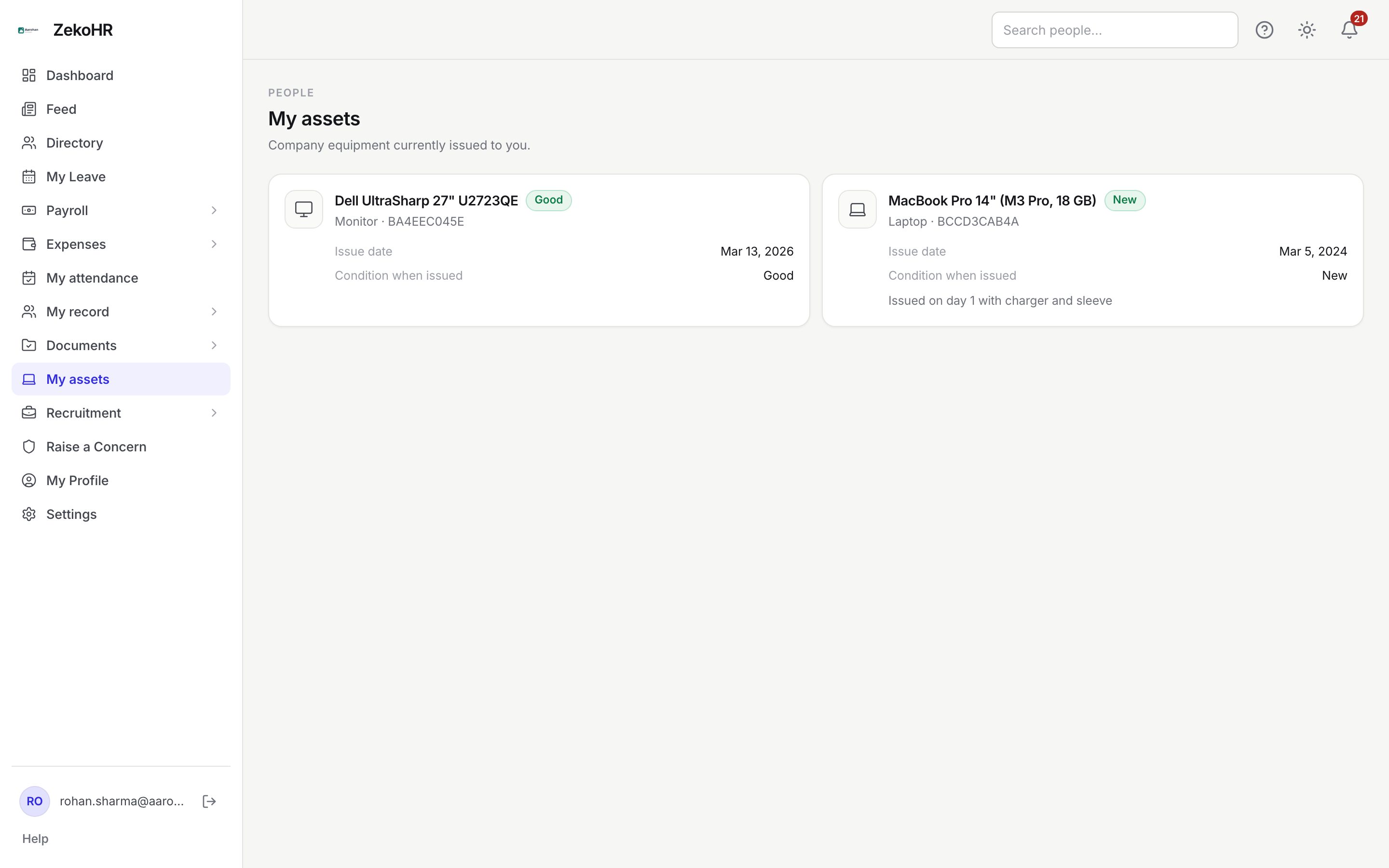
Reading a card
Each asset is one card:
- Name with a condition badge (New, Good, Fair, Poor or Damaged). The badge shows the condition recorded when it was issued to you, or the asset's current condition if none was recorded at issue.
- Category (Laptop, Desktop, Monitor, Phone, Tablet, Accessory, Furniture, Vehicle, SIM or Other) followed by the serial number, when one exists.
- Issue date: the date HR recorded the handover.
- Issued in: the condition at handover, or Not recorded.
- Any notes HR wrote at issue time, for example "Issued on day 1 with charger and sleeve".
Cards are sorted by asset name and laid out two per row on wider screens, one per row on a phone.
What the badges mean
| Badge | Meaning | What happens next |
|---|---|---|
| New | Unused when issued | Keep it in that state as far as possible |
| Good | Working, normal wear | Nothing |
| Fair | Working with visible wear | Mention it when you return it |
| Poor | Working with significant wear | Ask HR whether a replacement is planned |
| Damaged | Issued with known damage, already recorded | HR already knows; it will not be counted against you at return |
What happens next
- When HR issues an asset to you it appears here immediately. There is no notification email for asset issue or return.
- When HR records a return, the card disappears. HR chooses the asset's next status (back in stock, in repair, retired or lost) and the condition on return; neither is shown to you.
- Issue and return are both written to the audit log with your user id and the condition, so there is a trail if a dispute arises later.
Rules and limits
- Only open assignments are shown: one card per item you currently hold.
- You cannot edit, return or transfer an asset yourself. Hand it to HR or IT and ask them to record the return; until they do, it stays on your list and remains your responsibility.
- The page is read-only for everyone, including HR, who use the register instead.
- Leaving the company: the offboarding checklist typically includes asset return; the card remains until HR records it.
- The Assets module must be enabled on your plan; Admins can check Settings → Billing.
Troubleshooting
The page says Nothing issued to you. HR has not recorded any equipment against you. If you are holding company kit, ask HR to issue it in the register so it is tracked correctly.
I returned my laptop but it still shows. HR has not recorded the return yet. Ask them to use Record return in the asset register.
The serial number on the card does not match my device. HR may have issued the wrong row. Report it so HR can record a return on the wrong asset and issue the right one.
The condition says Damaged but the device was fine. The badge shows the condition recorded at issue, or the asset's current condition. Ask HR to correct it; the issue record itself cannot be edited, but the asset's condition can.
I do not see My assets in the sidebar. The Assets module is not enabled on your plan, or your role lacks the permission to view your own assets.