Branding
Branding controls how the portal looks for everyone in your organisation: the name in the sidebar wordmark and browser tab, the primary colour used for buttons, links and focus rings, and the small square logo. The same values flow into every email ZekoHR sends on your behalf and into the sign-in page on your subdomain.
Who can do this: Admins and anyone with `roles.manage`, plus super admins. Every signed-in user reads the branding (the shell needs it), but only `roles.manage` can change it.
Where to find it
Administration → Settings → Other → Branding, URL `/settings/branding`.
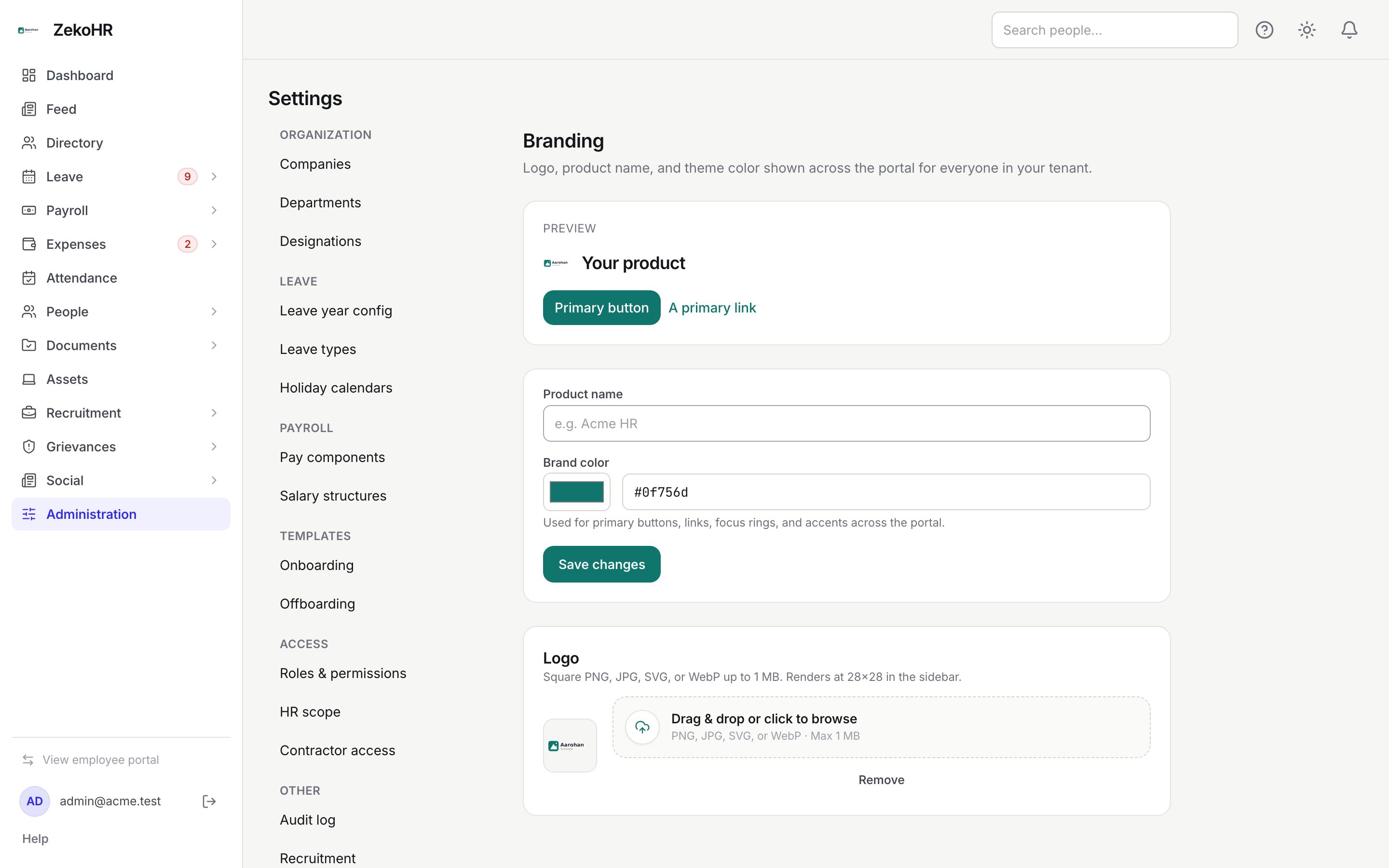
The page
The Preview card at the top mirrors the sidebar: the logo (or, with no logo, an initial chip in the pending colour), the product name, a Primary button and A primary link. It updates as you type, before you save.
Product name and colour
- Product name: up to 64 characters, for example "Acme HR". Leave it empty to keep the platform name.
- Brand color: pick with the colour swatch or type a hex value (7 characters, for example `#0f756d`) in the box beside it. The hint reads "Used for primary buttons, links, focus rings, and accents across the portal." The default is ZekoHR blue, `#4845f8`.
- Click Save changes. A Saved. confirmation appears and the whole portal repaints without a reload.

Logo
The Logo card accepts a square PNG, JPG, SVG or WebP up to 1 MB via Drag & drop or click to browse. The file uploads immediately (there is no separate save), replaces any earlier logo and renders at 28 by 28 pixels in the sidebar. Remove deletes it and the initial chip returns. Keep a transparent or white background; the logo is not recoloured.
What each value is used for
| Value | Portal | Emails | Sign-in page |
|---|---|---|---|
| Product name | Sidebar wordmark, browser tab title | `{{ product_name }}` token and the from-name | Heading on `{org}.zekohr.com/login` |
| Brand color | The primary colour across the portal | `{{ brand_color }}` and `{{ brand_color_contrast }}` tokens | Button and link colour |
| Logo | Sidebar mark | `{{ brand_logo_url }}` and `{{ brand_header_html }}` | Shown above the form |
White-label organisations
Whether an organisation is white-labelled is set by the ZekoHR team, not on this page. For a white-label organisation the product name you set here (or your organisation name if empty) replaces "ZekoHR" everywhere: the 2FA issuer name, export metadata, seeded help articles, the Razorpay checkout sheet and support labels ("Platform support"). Non-white-label organisations keep the ZekoHR name in those places even with a product name set, so the product name mainly brands the wordmark and emails. The browser tab icon stays the platform's.
What happens next
- Saving writes `tenant_branding.updated` to the audit log with the submitted values; logo changes write `tenant_branding.logo_uploaded` or `tenant_branding.logo_removed`.
- Everyone sees the new look on their next page load; you see it instantly.
- Emails rendered after the save use the new tokens. Open Settings → Email templates and use Send test to me to check.
Rules and limits
- One branding record per organisation; it is created the first time anyone opens the page.
- The hex box accepts only valid 6-digit hex; an invalid value is rejected on save.
- Uploads over the file-type or size limit are refused with the validation message.
- The sign-in page lookup is public and returns only name, logo URL and colour, nothing else about your organisation.
Troubleshooting
Save changes repainted the portal in a colour I did not choose. The form saves whatever the colour box holds. Set it back to `#4845f8` for the default and save again.
The logo looks blurry or cut off. Upload a square image of at least 56 by 56 pixels; it is scaled to fit and not cropped.
Emails still show the old logo. The public lookup is cached for a few minutes; wait and send another test.
I cannot open Branding at all. By default only Admins can open it.