Salary structures
A salary structure is a reusable template that says how a monthly gross is split into pay components. You build it once per company, then assign it to employees with their individual gross. Each payroll run reads the structure to compute every line of the payslip, so the rules here decide what every payslip looks like.
Who can do this: Admins with `payroll.manage.any`, HR Managers with `payroll.manage.assigned_companies`. Editing a structure that already has assignments needs the locked-config override, which only super admins and users with `roles.manage` can confirm.
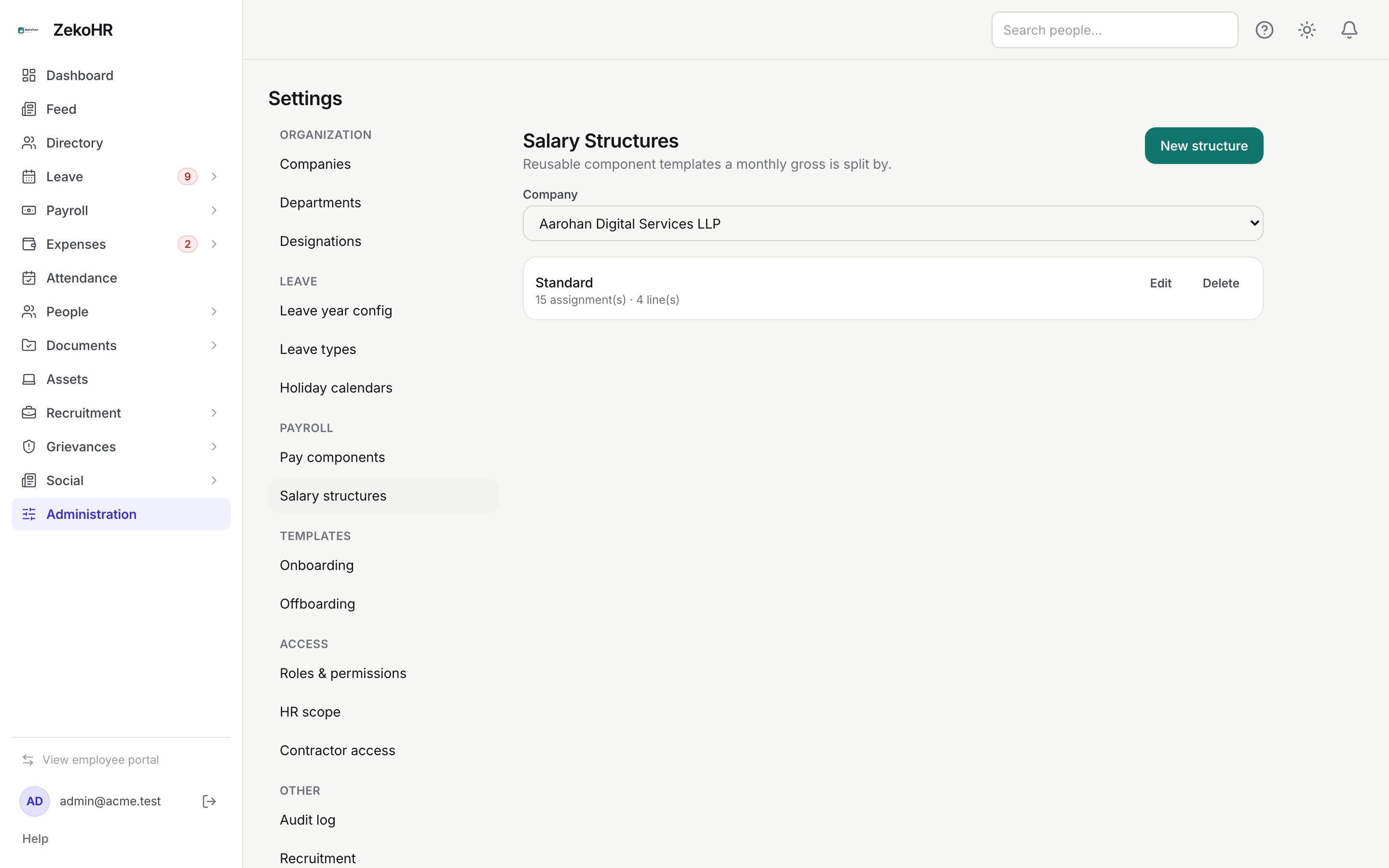
Where to find it
Sidebar Administration → Settings → Payroll → Salary structures, URL path `/settings/payroll/structures`. This module must be enabled on your plan; Admins can check Settings → Billing.
Creating a structure
- Select the Company, then click New structure.
- Name: required, up to 120 characters, unique within the company.
- Description: optional, up to 500 characters.
- Active: ticked by default. Inactive structures cannot be chosen for new assignments.
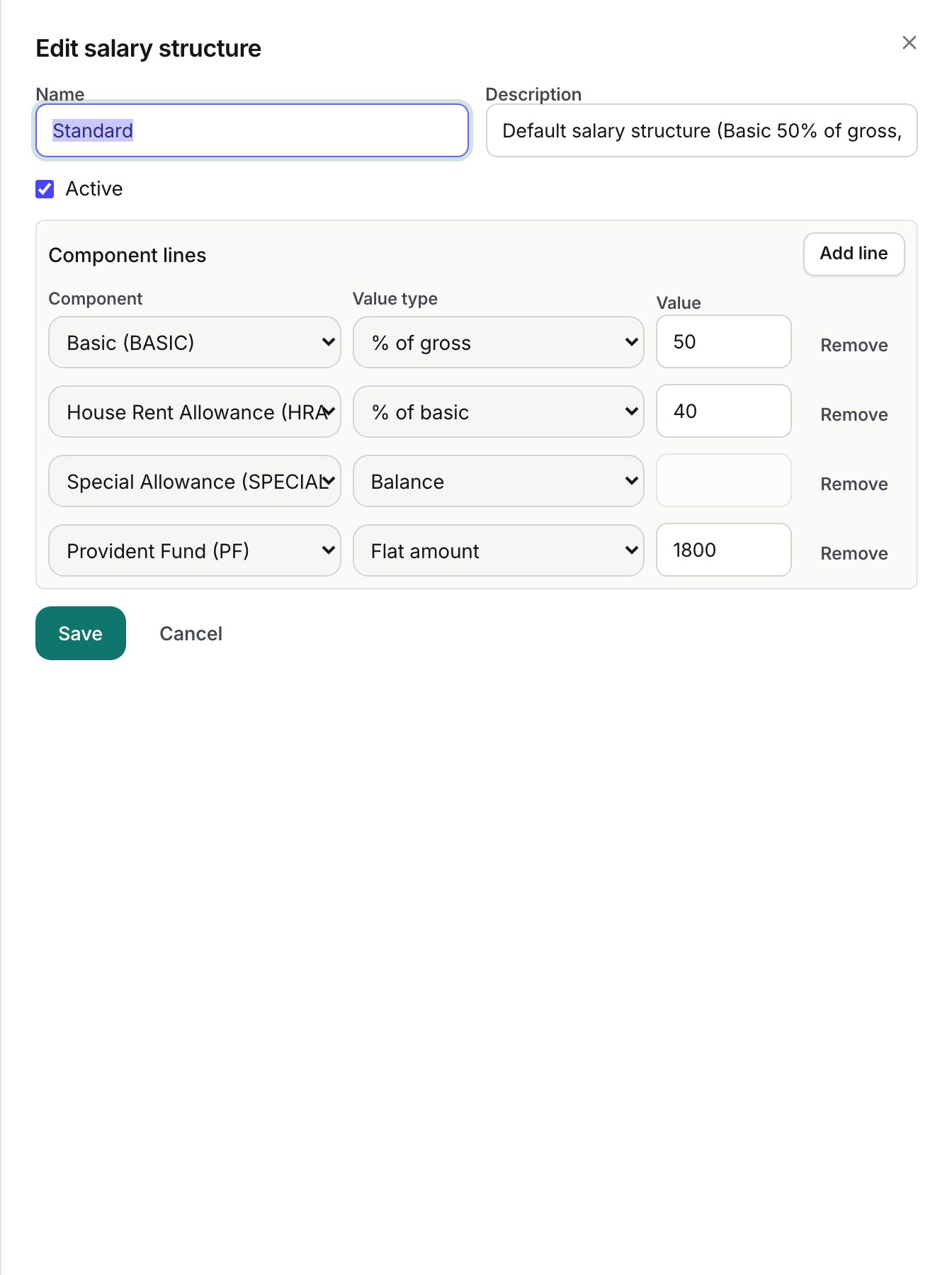
- Under Component lines, click Add line for each component. Per line:
- Component: any active pay component of the company (shown as name and code). A component may appear once per structure.
- Value type: Flat amount, % of basic, % of gross or Balance.
- Value: a number of 0 or more; disabled for Balance lines.
- Click Save. At least one line is required.
How each value type is computed
| Value type | Full-month amount |
|---|---|
| Flat amount | The value, in the company currency |
| % of gross | Value percent of the employee's monthly gross |
| % of basic | Value percent of the full-month amount of the line whose component is flagged Basic |
| Balance | Monthly gross minus every other earning line's full-month amount, floored at 0 |
After the full-month amounts are known, every line whose component is Prorated by paid days is multiplied by paid days divided by calendar days. Each line is rounded to two decimals; gross earned, total deductions and net pay are sums of the rounded lines.
A common Indian structure: Basic = 50 % of gross, HRA = 40 % of basic, Conveyance = flat 1,600, Special Allowance = balance, PF = flat deduction, PT = flat deduction. Try it in the salary assignment Preview before assigning; see Assigning salaries.
Validation rules
- At most one Balance line, and it must be an earning. Its value is ignored.
- A % of basic line requires a line in the same structure whose component is flagged Basic and whose value type is Flat amount or % of gross. The dialog shows the hint in red as you build.
- Every non-balance line needs a value.
- Components must belong to the same company as the structure.
Editing a structure with assignments
Lines are replaced wholesale on every save. If the structure already has salary assignments, saving is refused with "This structure has active salary assignments. Changing it affects future payroll computation for those employees." and an override prompt. Confirming applies the change and writes an override entry to the audit log. Only draft payslips are affected (after Recalculate); finalized and published payslips keep their snapshot.
Deleting
Delete removes an unassigned structure. One with assignments is refused ("Deactivate it instead"); confirming the override marks it inactive rather than deleting, so existing assignments keep working.
What happens next
- Every create, update, delete and forced change writes to the audit log.
- The list shows N assignment(s) · N line(s) per structure so you can see which ones are in use.
- The payroll pre-flight raises an error if an assigned structure has no lines and a warning if it has been deactivated.
Rules and limits
- Deductions are entered as positive values and subtracted; a structure where deductions exceed earnings produces negative net pay, which blocks finalizing.
- Statutory components (PF, ESI, PT, TDS) are ordinary lines with the value you type. ZekoHR does not compute statutory amounts or slabs.
- Structures are per company; HR Managers see only companies in their scope.
- There is no versioning. To change rules from a future month without affecting people already assigned, create a new structure and assign it with a future effective-from date.
Troubleshooting
The Component dropdown is empty. The company has no active pay components. Create them first under Pay components.
Save says Each pay component may appear only once. Remove the duplicate line.
Special Allowance comes out as zero. The other earnings already add up to the gross or more; the balance line is floored at 0. Lower the percentages or the flat amounts.
My change did not reach existing payslips. Open the draft run and click Recalculate. Locked runs never change.